
ModsJava
Who Is My Friend (WIMF)
Client-side friend management tool designed to help you remember everyone you meet on your Minecraft adventures.
⬇ Download on Modrinth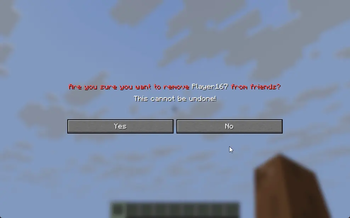
Interface Integration
- Complete removal of chat commands. All management has been moved to the Graphical User Interface (GUI).
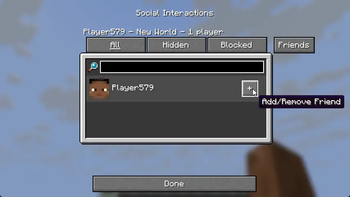
- Added a "Friends" tab to the standard "Social Interactions" menu (Key P).
- Added a "Settings" button (gear icon) inside the Friends tab.
Friend List
- Offline Mode: Players remain in the list after leaving the server.
- Statuses: Visual distinction between online and offline players (customizable nickname colors).
- Activity Tracking: Added "Last Seen" status with a time counter.
- Favorites: Ability to mark a friend with a "Star" to pin them at the top of the list during sorting.
- Control Buttons: Add/Remove, Favorite, and Open Notes buttons added to each player entry.
- Action Confirmation: Added a confirmation screen when removing a friend.
Notes System
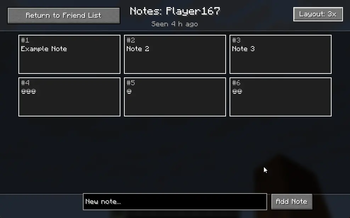
- Completely new GUI for note management.
- Grid View: Ability to switch note display modes (1, 2, or 3 columns).
- Inline Editing: Note text editing happens directly within the list entry, without opening additional windows.
- Bulk Deletion: Added checkboxes for selecting multiple notes and a button to delete selected items.
- Visualization: Added borders for notes, a proper scrollbar, and enlarged input fields.
Settings and Configuration
- Settings menu for changing status colors (Online/Offline) via HEX codes.
- Reworked data saving system: switched to UUID storage for correct offline player handling.
Removed
- All text commands (/friend add, /friend list, etc.).
Quick facts
- Edition: Minecraft Java
- File type: .jar
- Minecraft version listed: 1.21.7
- How to install: Install the matching mod loader (Forge, Fabric or NeoForge) for your Minecraft version. → Download the .jar. → Put it in the .minecraft/mods folder and launch that loader profile.
- Where to get it: Opens on Modrinth — not every file is mirrored on our own servers.
Install steps are the general flow for this file type — How to install Minecraft Java mods & modpacks walks through it step by step.
Verified by MCModsHub
- Ships as whoismyfriendswimf-0.0.6-release.jar — drop this file into the mods folder
- Download size: 54 KB
- Download link checked 5 Sept 2026 — working
These come from our own check of the pack file, not from the source page.