
Image Overlay
Java mod listed for Minecraft 26.x. Downloads from the MC Java Mods app on Android.
I don't know my version or loader
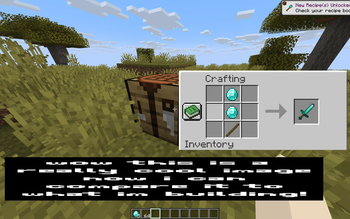
Renders up to 2 reference images on screen while playing. Inspired by Blender's reference image feature.
Features:
- Upload up to 10 images using URLs
- Display up to 2 images on screen at a time
- Quickly switch between uploaded images
- Customize the position and size of each image
- Settings menu made with Mod Menu and Cloth Config
Notes:
- Files are uploaded through URLs (read below)
- Minecraft is very particular about file formats, so files must be native PNG files (not just renamed JPG or other)
How to Upload Files:
As mentioned previously, files are uploaded through URLs. The most efficient way I've found to do this is to go to imgur, upload your image(s), wait for it to say "Upload Complete", then right click the image and click "Copy Image Address" (do NOT click "Copy Link"), then paste that into the URL field in this mod's settings. Note: To open the config menu, you will need Mod Menu and Cloth Config API installed.
Summary:
- Upload to imgur
- Wait for "Upload Complete" banner
- Right click - "Copy Image Address"
- Paste into settings
- Edition: Minecraft Java
- File type: .jar
- Minecraft versions listed: 26.1, 26.1.1, 26.1.2
- How to install: Install the matching mod loader (Forge, Fabric or NeoForge) for your Minecraft version. → Download the .jar. → Put it in the .minecraft/mods folder and launch that loader profile.
- Where to get it: Opens on Modrinth — not every file is mirrored on our own servers.
Install steps are the general flow for this file type — How to install Minecraft Java mods & modpacks walks through it step by step.
- Ships as reference_image_overlay-1.1.0+26.1.jar — drop this file into the mods folder
- Download size: 17 KB
- Download link checked 15 Oct 2026 — working
These come from our own check of the pack file, not from the source page.