MCMidi
MCMidi is a Minecraft Fabric mod that allows you to play MIDI files in-game with high-quality sound and real-time visualization.
⬇ Download on Modrinth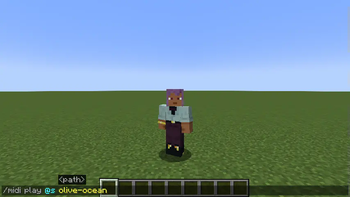
MCMidi
MCMidi is a Minecraft Fabric mod that allows you to play MIDI files in-game with high-quality sound and real-time visualization.
Features
- MIDI Playback: Play
.midior.midfiles directly within your Minecraft client. - Custom SoundFonts: Support for
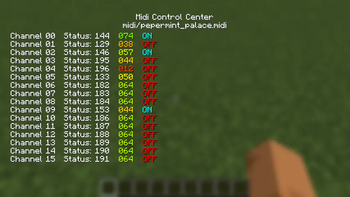
.sf2SoundFont files to customize your instrument sounds. - Real-time Visualization: A dedicated "Midi Control Center" with multiple visualization tabs:
- Detail: Real-time MIDI message log, BPM, and playback position.
- Nodes: Visual representation of active MIDI nodes. (Not implemented.)
- Piano: A virtual piano roll showing active notes.(Not implemented.)
- Waveform: Dynamic waveform visualization. (Not implemented.)
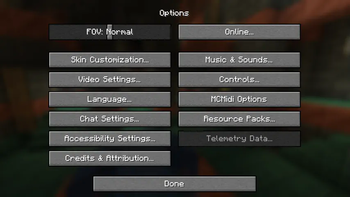
- In-Game Configuration: Integrates with Mod Menu and Cloth Config for seamless setting adjustments.
- Client-Side Commands: Quick control over playback using console commands.
Command Usage
Manage your MIDI playback using the following client-side commands:
/midi play <filename>: Plays a MIDI file from your local library./midi stop: Stops the current MIDI playback.
How to Use
- Prepare your files:
- Place your
.midior.midfiles in themidi/musics/directory within your Minecraft instance folder. - (Optional) Place your
.sf2SoundFont files in themidi/soundfonts/directory.
- Place your
- Launch Minecraft: Open the Midi Control Center by pressing
,(default keybind). - Configure Settings: Open the Mod Menu from the main menu, find MCMidi, and click the gear icon to adjust volume or select a custom SoundFont.
Implemented Architecture
MCMidi is built with a focus on modularity and maintainability:
- Dependency Injection: Uses an abstracted
IConfigManagerto handle configuration without global static state. - Abstracted Tab System: Leverages
KarasunikiLib'sITabBarandITabContentinterfaces to provide a flexible and extensible UI. - Decoupled MIDI Engine: Uses the
IMidiEngineinterface, allowing the mod to support different MIDI drivers or external devices in the future.
Dependencies
This mod requires the following libraries:
- Fabric API
- KarasunikiLib
- Cloth Config API
- Mod Menu (Optional, recommended for configuration UI)
Contribution
Contributions are welcome! If you have suggestions, bug reports, or would like to submit a pull request, please follow these steps:
- Fork this repository and create your branch from
master. - Make your changes with clear commit messages.
- Ensure your code builds and passes any existing checks.
- Submit a pull request with a description of your changes.
For major changes, please open an issue first to discuss what you would like to change.
License
This project is licensed under the MIT License. See LICENSE for details.
- Edition: Minecraft Java
- File type: .jar
- Minecraft version listed: 1.21.7
- How to install: Install the matching mod loader (Forge, Fabric or NeoForge) for your Minecraft version. → Download the .jar. → Put it in the .minecraft/mods folder and launch that loader profile.
- Where to get it: Opens on Modrinth — not every file is mirrored on our own servers.
Install steps are the general flow for this file type — How to install Minecraft Java mods & modpacks walks through it step by step.
- Ships as karasu-lab-mcmidi-fabric-2.1.2-1.21.7.jar — drop this file into the mods folder
- Download size: 80 KB
- Download link checked 5 Sept 2026 — working
These come from our own check of the pack file, not from the source page.