
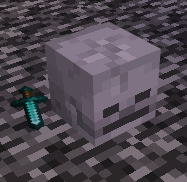
What does it do? Universal Graves uses Polymer to render virtual blocks and display entity based graves. Java players see a nice custom grave. Bedrock players joining through Geyser often see nothing at all or just interact with an invisible block.
This server side addon translates Universal Graves into something Bedrock understands. It only affects Bedrock players. Java players still see the original grave.
For Bedrock players near a grave, the mod
- Renders a skeleton skull block at the grave position
- Spawns an invisible armor stand to show grave text
- Spawns an invisible fox holding the first grave item as a visual hint
- When a Bedrock player opens the grave user interface, the mod swaps Polymer player head buttons for simple vanilla icons so the menu makes sense.
Requirements
- Minecraft Java 1.21.10 (Tested)
- Fabric Loader plus Fabric API
- Universal Graves
- Geyser
- Floodgate recommended for detection
Drop the jar in your server mods folder, restart, and Bedrock players should finally see where they died.
- Edition: Minecraft Java
- File type: .jar
- Minecraft versions listed: 1.21.9, 1.21.10
- How to install: Install the matching mod loader (Forge, Fabric or NeoForge) for your Minecraft version. → Download the .jar. → Put it in the .minecraft/mods folder and launch that loader profile.
- Where to get it: Opens on Modrinth — not every file is mirrored on our own servers.
Install steps are the general flow for this file type — How to install Minecraft Java mods & modpacks walks through it step by step.
- Ships as universalgraves-geyser-1.0.0.jar — drop this file into the mods folder
- Download size: 29 KB
- Download link checked 5 Sept 2026 — working
These come from our own check of the pack file, not from the source page.