
Noisy No More
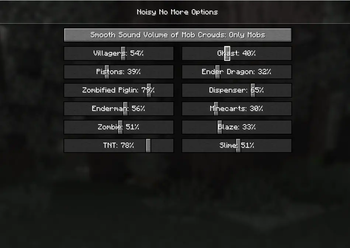
Noisy No More is a client-side Minecraft mod that adds extra sliders to control the volume of specific, often loud sound sources — like pistons, dispensers, villagers, and enderman. It also introduces an optional volume model that automatically lowers the combined volume when multiple identical sounds play at once.
Features
- Volume sliders for noisy blocks and entities like pistons, dispensers, villagers, enderman, and more.
- Alternative volume model with two modes:
- Off — uses the default Minecraft sound system.
- Only mobs — reduces volume only for mobs.
- Client-side only — works in singleplayer or on any server without needing server installation.
- Future backports — planned support for older Minecraft versions (coming later).
How to configure
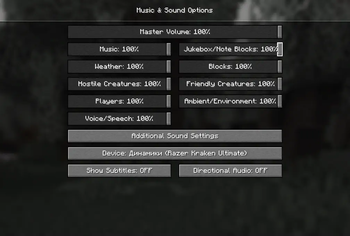
To access the settings, go to:
Options → Music & Sounds → Additional Sound Options
Dependencies
Installation
- Install Fabric and Fabric API.
- Download Noisy No More from Modrinth or GitHub.
- Put the
.jarfile into your Minecraftmodsfolder. - Launch the game using the Fabric profile.
🎧 Make Minecraft sound exactly the way you want — no more noisy surprises!
Quick facts
- Edition: Minecraft Java
- File type: .jar
- Minecraft version listed: 1.21.5
- How to install: Install the matching mod loader (Forge, Fabric or NeoForge) for your Minecraft version. → Download the .jar. → Put it in the .minecraft/mods folder and launch that loader profile.
- Where to get it: Opens on Modrinth — not every file is mirrored on our own servers.
Install steps are the general flow for this file type — How to install Minecraft Java mods & modpacks walks through it step by step.
Verified by MCModsHub
- Ships as noisy-no-more-1.1.0.jar — drop this file into the mods folder
- Download size: 18 KB
- Download link checked 5 Sept 2026 — working
These come from our own check of the pack file, not from the source page.