
Weather Tweaks
Java mod listed for Minecraft 1.21. Downloads from the MC Java Mods app on Android.
A client-side Minecraft mod that gives you complete control over weather rendering. Override weather conditions, customize precipitation types, adjust…
⬇ Download on Modrinth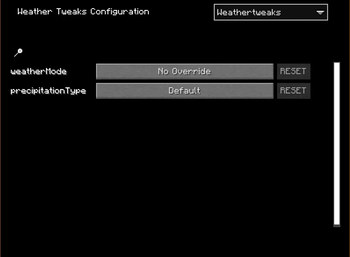
Weather Tweaks
A client-side Minecraft mod that gives you complete control over weather rendering. Override weather conditions, customize precipitation types, adjust intensity, and create the perfect atmosphere for your gameplay!
Features
- Complete Weather Control: Override weather rendering with multiple modes
- Flexible Precipitation: Choose between rain and snow, or use biome defaults
- Customizable Intensity: Fine-tune precipitation and thunder effects
- Thunderstorm Mode: Create dramatic storms with configurable sky darkness and thunder frequency
- Precipitation Radius: Limit weather effects to a specific area around you
- Client-Side Only: Works on any server without requiring server-side installation
- Real-Time Updates: All settings apply instantly with no restart needed!
Configuration
Access the configuration menu through Mod Menu (requires the Mod Menu mod to be installed).
Configuration Options
Weather Override
Choose how weather is rendered in your world:
- No Override (Default): Use the world's natural weather
- When active, you can also set Precipitation Type to override rain/snow rendering
- Always Clear: Force clear skies with no precipitation or thunder
- Always Rain: Continuous rainfall with customizable intensity
- Always Snow: Continuous snowfall with customizable intensity
- Thunderstorm: Create a dramatic storm with rain or snow, thunder, and dark skies
Precipitation Type
Available when Weather Override is set to "No Override" or "Thunderstorm"
Choose what type of precipitation to render:
- Default: Use the biome's natural precipitation type
- Rain: Force rain particles
- Snow: Force snow particles
Precipitation Intensity
Available when Weather Override is set to "Always Rain", "Always Snow", or "Thunderstorm"
- Adjust the intensity of precipitation from 1% to 100%
- Default: 100%
Sky Darkness
Available when Weather Override is set to "Thunderstorm"
- Control how dark the sky becomes during thunderstorms
- Range: 1% to 100%
- Default: 100%
Thunder Frequency
Available when Weather Override is set to "Thunderstorm"
- Adjust how often thunder and lightning occur
- Range: 0 (Never) to 100 (Maximum)
- Default: 50 (Vanilla frequency)
Precipitation Radius
Available when Weather Override is set to "Always Rain", "Always Snow", or "Thunderstorm"
- Limit precipitation to a specific radius around your player
- Range: 0 (Everywhere) to 500 blocks
- Default: 0 (precipitation appears everywhere)
Requirements
- Minecraft: 1.21.9 or higher
- Fabric Loader: 0.14.21 or higher
- Fabric API: Required
- MaliLib: Required (dependency for configuration)
- Mod Menu: Recommended (for easy access to configuration)
- Edition: Minecraft Java
- File type: .jar
- Minecraft versions listed: 1.21.9, 1.21.10, 1.21.11
- How to install: Install the matching mod loader (Forge, Fabric or NeoForge) for your Minecraft version. → Download the .jar. → Put it in the .minecraft/mods folder and launch that loader profile.
- Where to get it: Opens on Modrinth — not every file is mirrored on our own servers.
Install steps are the general flow for this file type — How to install Minecraft Java mods & modpacks walks through it step by step.
- Ships as WeatherTweaks-1.0.0.jar — drop this file into the mods folder
- Download size: 55 KB
- Download link checked 16 Oct 2026 — working
These come from our own check of the pack file, not from the source page.