
PortalExtensions StationAPI for Minecraft Beta 1.7.3
A babric mod for Minecraft Beta 1.7.3 that adds modern Minecraft portal sizes and other portal tweaks.
- Mod works on Multiplayer with GlassConfigAPI version 3.0+ used to sync configs!
Features
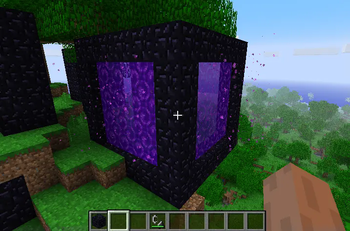
- Modern nether portal sizes
- Ability to disable nether portal disappearance (nether portals will act like glass blocks)
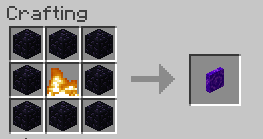
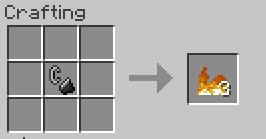
- Ability to add nether portal crafting recipe (including fire crafting recipe as a necessary component)
Recipes Can Be Added via Config
(Requires StationAPI to be installed)
- See image gallery
Installation using Prism Launcher
- Download an instance of Babric for Prism Launcher: https://github.com/babric/prism-instance
- Install Java 17 and set the instance to use it: https://adoptium.net/temurin/releases/
- Add GlassConfigAPI 3.0.2+ to the mod folder for the instance: https://modrinth.com/mod/glass-config-api
- Add Glass Networking to the mod folder for the instance: https://modrinth.com/mod/glass-networking
- (Optional) Add StationAPI to the mod folder for the instance: https://modrinth.com/mod/stationapi
- (Optional) Add Mod Menu to the mod folder for the instance: https://modrinth.com/mod/modmenu-beta
- Add this mod to the mod folder for the instance: https://github.com/telvarost/PortalExtensions-StationAPI/releases
- Run and enjoy! 👍
Feedback
Got any suggestions on what should be added next? Feel free to share it by creating an issue. Know how to code and want to do it yourself? Then look below on how to get started.
Contributing
Thanks for considering contributing! To get started fork this repository, make your changes, and create a PR.
If you are new to StationAPI consider watching the following videos on Babric/StationAPI Minecraft modding: https://www.youtube.com/watch?v=9-sVGjnGJ5s&list=PLa2JWzyvH63wGcj5-i0P12VkJG7PDyo9T
- Edition: Minecraft Java
- File type: .jar
- Minecraft version listed: b1.7.3
- How to install: Install the matching mod loader (Forge, Fabric or NeoForge) for your Minecraft version. → Download the .jar. → Put it in the .minecraft/mods folder and launch that loader profile.
- Where to get it: Opens on Modrinth — not every file is mirrored on our own servers.
Install steps are the general flow for this file type — How to install Minecraft Java mods & modpacks walks through it step by step.
- Ships as PortalExtensions-1.1.1.jar — drop this file into the mods folder
- Download size: 450 KB
- Download link checked 5 Sept 2026 — working
These come from our own check of the pack file, not from the source page.