
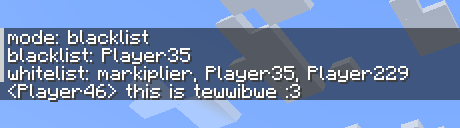
A very basic minecraft chat uwuifier
Use /uwuconfig to control it. You can toggle between whitelist and blacklist modes, and add or remove people from both. Running uwuconfig without giving a value to set something to will show what that value currently is. Running just uwuconfig will show all available info
In whitelist mode, only players in the whitelist will have their messages uwuified
In blacklist mode, everyone except players in the blacklist will have their messages uwuified
The errors if the server console or rcon says something are a known issue
When installed on the client it'll uwuify all your own messages (can't be confgured), unless it's also on the server
- Edition: Minecraft Java
- File type: .jar
- Minecraft version listed: 1.20.1
- How to install: Install the matching mod loader (Forge, Fabric or NeoForge) for your Minecraft version. → Download the .jar. → Put it in the .minecraft/mods folder and launch that loader profile.
- Where to get it: Opens on Modrinth — not every file is mirrored on our own servers.
Install steps are the general flow for this file type — How to install Minecraft Java mods & modpacks walks through it step by step.
- Ships as uwuifier-mc-1.1.1.jar — drop this file into the mods folder
- Download size: 51 KB
- Download link checked 5 Sept 2026 — working
These come from our own check of the pack file, not from the source page.