

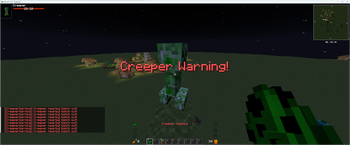
Warns the player if there's a creeper within explosion range
Commands:
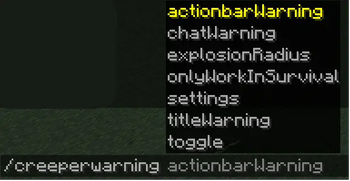
/creeperwarning chatWarning <true or false> - Enables or disables the chat warning feature (default: true).
/creeperwarning titleWarning <true or false> - Enables or disables the title warning feature (default: true).
/creeperwarning actionbarWarning <true or false> - Enables or disables the actionbar warning feature (default: true).
/creeperwarning onlyWorkInSurvival <true or false> - Configures whether the mod should only work in survival mode (default: true).
/creeperwarning explosionRadius <radius> - Sets the explosion radius for creeper detection (default: 3.5).
/creeperwarning toggle - Toggles the entire Creeper Warning Mod on or off.
/creeperwarning settings - Displays the current settings of the Creeper Warning Mod.
Keybinds:
C - Toggles the mod
- Edition: Minecraft Java
- File type: .jar
- Minecraft versions listed: 1.20.4, 1.20.5, 1.20.6
- How to install: Install the matching mod loader (Forge, Fabric or NeoForge) for your Minecraft version. → Download the .jar. → Put it in the .minecraft/mods folder and launch that loader profile.
- Where to get it: Opens on Modrinth — not every file is mirrored on our own servers.
Install steps are the general flow for this file type — see the MC Java Mods guides for the full walkthrough.
- Ships as Creeper-Warning-1.0.2.jar — drop this file into the mods folder
- Download size: 38 KB
- Download link checked 5 Sept 2026 — working
These come from our own check of the pack file, not from the source page.