
AI Integrated+
The most feature-rich in-game AI assistant for Minecraft — persistent memory, markdown rendering, and a powerful model. No external apps, no alt-tabbing.
Important Message
The model that this mod uses, Llama 70B Versatile, has been deprecated. This means you must switch the model to Qwen3.6 27B in config for the mod to continue working.
AI Integrated+ adds a fully-featured in-game AI chat interface powered by llama-3.3-70b-versatile via Groq — one of the fastest and most capable freely available large language models. Whether you need help with a redstone circuit, want to know the best enchantments for your sword, need a quick recipe lookup, or just want someone to talk to while mining — AI Integrated+ has you covered, all without ever leaving the game.
Why AI Integrated+?
- 🧠 Persistent memory — the AI actually remembers past conversations across sessions, unlike other AI mods that forget everything the moment you close the chat
- 💬 Markdown rendering — responses display with real formatting including bold, italic, code blocks, headings and bullet points — not walls of raw unformatted text
- 🔒 Built-in proxy — no API key required to get started, and if you use your own key it is never exposed to other players or logged by the mod
- ⚡ llama-3.3-70b-versatile — a significantly smarter and more capable model than the basic Llama models used by other AI mods, with better reasoning and more accurate answers
- ⚙️ Deep configurability — swap models, set custom endpoints, control memory, and tweak the system prompt all from inside the game
- 🎮 Non-intrusive overlay — the chat opens as an overlay and never pauses or interferes with your game
Features
🤖 In-Game AI Chat
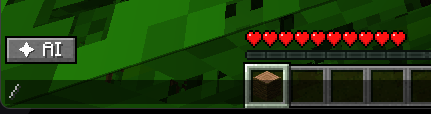
Press Y (rebindable in Options → Controls) to open the AI chat overlay at any time during gameplay. The interface renders on top of your game as a clean overlay and does not pause it — you can ask a question mid-fight, mid-build, or mid-exploration without any interruption. The chat window is resizable and stays out of your way when closed.
🧠 Persistent Memory — Two Separate Files
Unlike most AI mods that start fresh every time, AI Integrated+ saves your conversation history locally and reloads it on every session. Crucially, memory is split into two separate files:
aiintegrated_memory.json— stores the AI's actual memory and full conversation context that gets sent to the model. This is what makes the AI remember who you are and what you've discussed.aiintegrated_chat.json— stores the visible chat history displayed on screen, so you can see your past messages in the overlay.
This split means you can clear the chat display to remove clutter from the screen without wiping the AI's memory — the AI will still remember everything even after you clear the visible history. Both files can be managed independently from the in-game config screen.
⚡ Fast Responses
Responses are powered by Groq's high-speed inference infrastructure, which is purpose-built for low-latency LLM serving. In practice this means near-instant replies — typically under a second — so the conversation feels natural and doesn't break your flow.
🔒 Privacy-First Proxy
By default, all API requests are routed through a secure built-in proxy server — meaning you don't need an API key at all to start using the mod, and your identity is never exposed to the upstream API. If you prefer full control, you can supply your own Groq API key and custom endpoint in the settings screen. Either way, no chat data is collected or logged by this mod.
⚙️ In-Game Config Screen
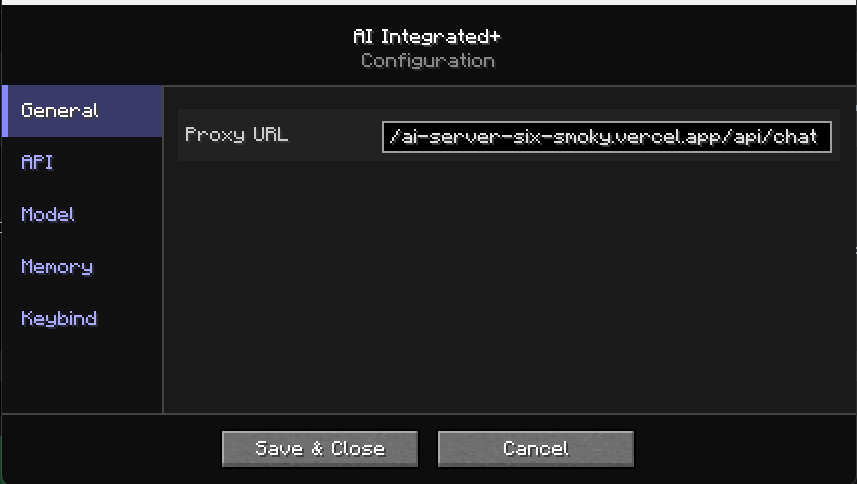
A fully featured settings screen is accessible via ModMenu or the /ai command family. Settings are organised into clear tabs:
- General — Proxy URL configuration
- API — Personal API key and custom endpoint for power users
- Model — Model name selection and extra instructions appended to the system prompt
- Memory — Toggle memory on/off, clear AI memory independently, clear chat history independently, view current message count
- Keybind — Reminder to set your preferred key in Options → Controls
All changes take effect immediately without restarting the game.
💬 Rich Text Rendering
AI responses are parsed and rendered with full markdown-style formatting. This includes bold, italic, inline code, fenced code blocks, # headings, and • bullet points. Responses are easy to read at a glance rather than being dumped as a single unformatted wall of text.
🔄 Scrollable Chat History
The chat window supports full mouse scroll with a visual scrollbar on the side. The view automatically scrolls to the latest message when a new response arrives, but you can freely scroll back through the entire conversation history at any time.
Commands
| Command | Description |
|---|---|
/ai setkey <key> |
Set your personal Groq API key |
/ai seturl <url> |
Set a custom API endpoint |
/ai setmodel <model> |
Change the AI model |
/ai status |
Show current configuration and connection status |
Requirements
- Fabric Loader
- Fabric API
- ModMenu (optional, for the in-game settings screen)
Compatibility
- Fully client-side — works on any server, vanilla or modded
- Compatible with other chat mods as long as they do not fully replace the chat renderer
- Tested on Fabric for Minecraft 1.21.x
Privacy
All chat data is sent exclusively to either the built-in proxy server or your own configured API endpoint — nothing else. No telemetry, no analytics, no data collection of any kind. Both memory files are stored entirely locally in your .minecraft/config/ folder and never leave your machine unless you are using your own API key with a third-party endpoint. You can clear AI memory and chat history independently at any time from the in-game config screen.
- Edition: Minecraft Java
- File type: .jar
- Minecraft version listed: 1.21.11
- How to install: Install the matching mod loader (Forge, Fabric or NeoForge) for your Minecraft version. → Download the .jar. → Put it in the .minecraft/mods folder and launch that loader profile.
- Where to get it: Opens on Modrinth — not every file is mirrored on our own servers.
Install steps are the general flow for this file type — How to install Minecraft Java mods & modpacks walks through it step by step.
- Ships as aiintegrated-1.21.11-1.8.9-1.8.9.jar — drop this file into the mods folder
- Download size: 361 KB
- Download link checked 5 Sept 2026 — working
These come from our own check of the pack file, not from the source page.