
Alloy
The Alloy mod is an expansion for Minecraft that adds new materials, tools, armor, and unique resource processing mechanics to the game.
⬇ Download on Modrinth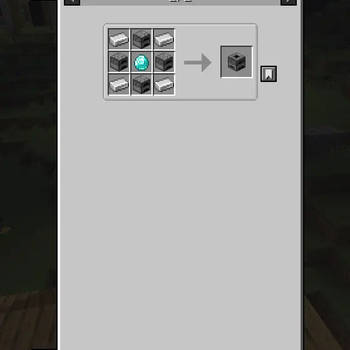
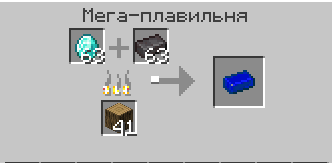
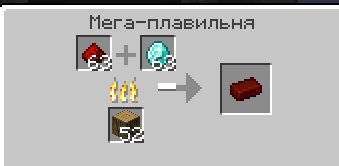
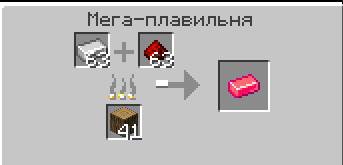
⚒️ Alloy
Alloy is a mod that significantly expands the possibilities of the game by introducing new metals, tools, armor and production units. The mod is aimed at players who want to diversify the process of mining, processing and using resources, as well as gain new experiences from crafting and progression.
✨ What does the mod add?
🔩 New metals and alloys
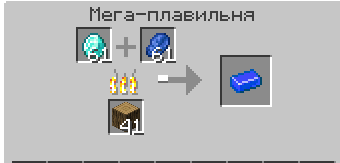
Unique materials such as Azurite, Bronze, Aurum, Aquitaine, Amethyst, Hell Metal and others are added to the game. Each metal has its own properties, appearance and production methods.
🛠️ Tools and weapons
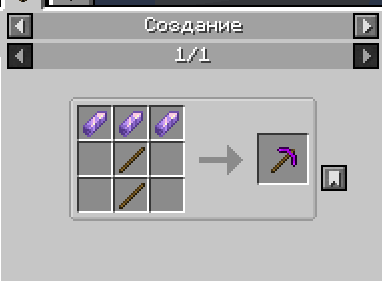
For each new material, a complete set of tools (pickaxe, axe, shovel, hoe, sword) with unique characteristics of strength, speed and damage are implemented.
🛡️ Armor
Each metal allows you to create a complete set of armor, featuring protection and additional effects:
- Amethyst Armor — grants Night Vision effect
- Azurite Armor — grants Speed effect
- Aquitaine Armor — grants Jump Boost effect
- Hell Armor — grants Fire Resistance effect
- Aurum Armor — grants Regeneration effect
🏭 New production units
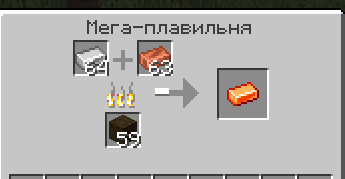
The mod features a unique block — Mega Smelter, which allows you to melt ores and materials more efficiently and quickly, and also has its own interface and animation.
📜 Crafting Recipes
Balanced recipes are implemented for all new items and blocks, integrated into the standard Minecraft crafting system.
🎨 Unique textures and models
All items, blocks and armor have their own high-quality textures and 3D models that harmoniously fit into the style of the game.
🏆 Achievements System
The mod includes a comprehensive achievement system to track your progress:
- 🔥 Embodiment of Fire — Craft a Mega Smelter
- ⚡ Spark of Progress! — Create your first alloy in the Mega Smelter
- 🌙 Master of Night — Craft a full set of amethyst armor
- 💎 First Blood of Earth — Mine any ore from the mod
🎯 Key Features
- ⚔️ Expansion of endgame content through new materials and improved tools
- 🔗 Production chains using new blocks and recipes
- 🎭 Visual and gameplay variety due to unique textures and effects
- ⚖️ Balanced gameplay — all items are carefully balanced and don't overpower vanilla content
- 🌍 Rare ore generation — ores spawn less frequently than diamonds, making them valuable
- 🎮 Seamless integration with vanilla Minecraft mechanics
💡 Why should you download Alloy?
🆕 New impressions: The mod adds a fresh look at the familiar Minecraft mechanics, making the process of mining and processing resources more interesting
⚖️ Balance and integration: All items and blocks are balanced and seamlessly blend into the vanilla gameplay
✨ High-quality implementation: The mod is characterized by high quality of execution, thoughtful textures and stable operation
🔄 Support and development: The project is actively developing, updates with new features are regularly released
🏆 Progression system: Achievements provide additional goals and rewards for your journey
Alloy is the perfect choice for players who want to expand the possibilities of Minecraft, get new challenges and make the gameplay even more exciting!
📋 Requirements
- Minecraft: 1.20.1
- Fabric Loader: ≥0.16.13
- Fabric API: Required
- Java: ≥17
🔧 Installation
- Install Fabric Loader for Minecraft 1.20.1
- Download and install Fabric API
- Place the Alloy mod file in your
modsfolder - Launch Minecraft and enjoy!
Made with ❤️ by ZDev
- Edition: Minecraft Java
- File type: .jar
- Minecraft versions listed: 1.20.1, 1.20.2, 1.20.3
- How to install: Install the matching mod loader (Forge, Fabric or NeoForge) for your Minecraft version. → Download the .jar. → Put it in the .minecraft/mods folder and launch that loader profile.
- Where to get it: Opens on Modrinth — not every file is mirrored on our own servers.
Install steps are the general flow for this file type — see the MC Java Mods guides for the full walkthrough.
- Ships as alloy-1.2.2.jar — drop this file into the mods folder
- Download size: 230 KB
- Download link checked 5 Sept 2026 — working
These come from our own check of the pack file, not from the source page.