Clue Scroll HUD for Vulengate
📜 A lightweight HUD mod for the Vulengate Minecraft server that displays clue scroll objectives and progress.
⬇ Download on Modrinth
Overview
Clue Scroll HUD is a lightweight client-side mod for the Vulengate Minecraft server that displays your clue scroll objectives and progress directly on the in-game HUD. No more opening your inventory and hovering over items to check your tasks!
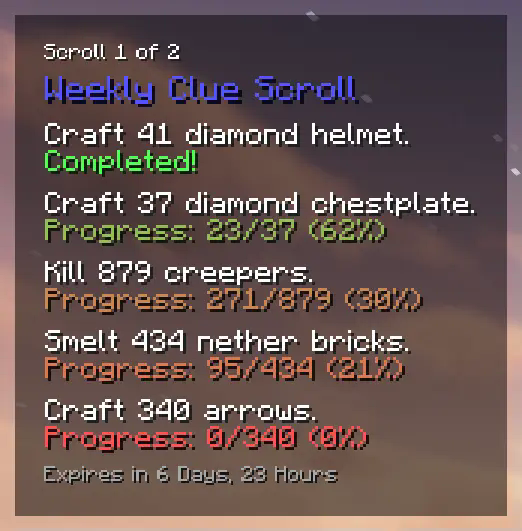
Features
- 📜 Automatically detects clue scrolls in your inventory.
- 🔍 Displays your scroll tiers, objectives, and progress directly on the HUD.
- ✅ Tracks task progress in real-time and highlights completed clues.
- ⏰ Shows time remaining before scrolls expire.
Dependencies
This mod has the following hard dependencies:
This mod also has an optional dependency on the Mod Menu mod.
Although Mod Menu is not required, it will make configuring this mod much easier.
Usage
- Download and install the mod and its dependencies.
- Join the Vulengate server and obtain a clue scroll in-game.
- The mod will automatically detect clue scrolls in your inventory and display information about them on-screen.
- Customise HUD appearance and behaviour in the mod’s config screen (via ModMenu, if installed as suggested).
Note: This mod is designed specifically for use on the Vulengate Minecraft server. When not playing on this server, it provides no additional functionality.
For further details, including bug reports, feature requests, and answers to frequently asked questions, please visit the mod's GitHub repository.
Copyright
This mod is an unofficial client-side mod developed for the Vulengate Minecraft server. No copyrighted or otherwise restricted resources have been used in the development of this mod. The "Vulengate" name and all associated trademarks are reserved by their respective owners.
Vulengate staff have given their consent for the development, distribution, and use of this mod.
This mod is licensed under the MIT License.
- Edition: Minecraft Java
- File type: .jar
- Minecraft version listed: 1.21.11
- How to install: Install the matching mod loader (Forge, Fabric or NeoForge) for your Minecraft version. → Download the .jar. → Put it in the .minecraft/mods folder and launch that loader profile.
- Where to get it: Opens on Modrinth — not every file is mirrored on our own servers.
Install steps are the general flow for this file type — How to install Minecraft Java mods & modpacks walks through it step by step.
- Ships as vg-cluescrollhud-3.0.0.jar — drop this file into the mods folder
- Download size: 52 KB
- Download link checked 5 Sept 2026 — working
These come from our own check of the pack file, not from the source page.