
ModsJava
Tab Friends
Never lose track of your friends on busy servers - Tab Friends brings them to the top of the player list with eye-catching visual highlights and…
⬇ Download on Modrinth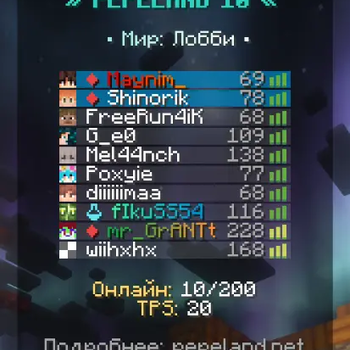
Tab Friends
A client-side mod for Minecraft that allows you to add players to a friends list. Friends are displayed first in the server player list.
Features
- Adding players to friends list via command
- Automatic sorting of player list: friends are always displayed first
- Visual highlighting of friends:
- Colored background in player list
- Customizable color and transparency through GUI
- Saving friends list between sessions
- Simple friends list management
- Integration with Mod Menu for convenient configuration through the game interface
Commands
All commands start with /tabfriend:
/tabfriend add <player>- add a player to the friends list/tabfriend remove <player>- remove a player from the friends list/tabfriend list- show the list of all added friends/tabfriend clear- clear the entire friends list/tabfriend- show command help
Visual Display Configuration
The background color for friends can be configured through Mod Menu:
- Install the Mod Menu mod (optional but recommended)
- In the game main menu, open "Mods"
- Find "Tab Friends" in the list and click the settings icon
- Available settings:
- Red, Green, Blue - color components (0-255)
- Transparency - background transparency level (0 = fully transparent, 255 = fully opaque)
- Color Preview - ARGB color palette for quick selection
Default: dark green color with 50% transparency (0x80008800)
Settings are automatically saved to the config/tab-friends-config.json file
Quick facts
- Edition: Minecraft Java
- File type: .jar
- Minecraft version listed: 1.21.8
- How to install: Install the matching mod loader (Forge, Fabric or NeoForge) for your Minecraft version. → Download the .jar. → Put it in the .minecraft/mods folder and launch that loader profile.
- Where to get it: Opens on Modrinth — not every file is mirrored on our own servers.
Install steps are the general flow for this file type — How to install Minecraft Java mods & modpacks walks through it step by step.
Verified by MCModsHub
- Ships as tab-friends-1.0.1.jar — drop this file into the mods folder
- Download size: 43 KB
- Download link checked 5 Sept 2026 — working
These come from our own check of the pack file, not from the source page.