

🌍 ShadowBorders
ShadowBorders is a powerful per-dimension world border system for Minecraft Fabric servers. It allows server administrators to configure independent borders in each dimension, block player actions outside the defined area, and enforce custom behavior across portals, collisions, entity interactions, and more.
✅ Features:
- Per-Dimension Borders – Each dimension (Overworld, Nether, End, custom) can have its own unique border size and center.
- Full Vanilla Compatibility – Integrates seamlessly with Minecraft's native world border mechanics.
- Persistent Borders – Borders are saved per dimension and persist across server restarts.
- Teleportation Adjustments – Portals and spawn points are automatically clamped within border limits.
- Safe Zone, Damage, and Warnings – Fully configurable damage behavior and warning zones per dimension.
- Permission-Based Commands – Full support for permission systems like
LuckPerms. - Reloadable Config – Update borders without restarting the server.
⚡ Commands:
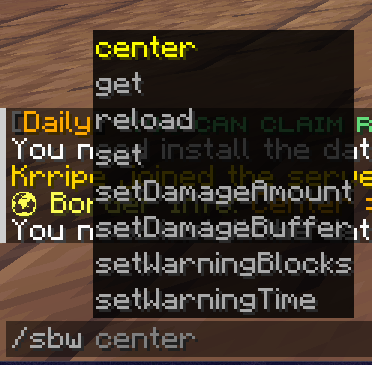
/sbw set <size>» Sets the border size in the current world./sbw center <x> <z>» Sets the center of the world border./sbw get» Displays information about the current world border./sbw reload» Reload the config and resync for all worlds./sbw setDamageAmount <value>» Damage per block when the player is out of bounds./sbw setDamageBuffer <value>» Buffer distance without damage./sbw setWarningBlocks <blocks>» Warning blocks before the border./sbw setWarningTime <seconds>» Warning time before reaching the border.
🔒 Permissions:
shadowboarder.set» Allows /sbw setshadowboarder.center» Allows /sbw centershadowboarder.get» Allows /sbw getshadowboarder.reload» Allows /sbw reloadshadowboarder.set.damage» Allows /sbw setDamageAmountshadowboarder.set.buffer» Allows /sbw setDamageBuffershadowboarder.set.warnblocks» Allows /sbw setWarningBlocksshadowboarder.set.warntime» Allows /sbw setWarningTime
📁 Configuration Files:
- 📁
/config/shadowboarders/config.json– Main plugin settings and messages. - 📁
/config/shadowboarders/borders.json– Per-dimension border data storage.
Quick facts
- Edition: Minecraft Java
- File type: .jar
- Minecraft versions listed: 1.21, 1.21.1, 1.21.2
- How to install: Install the matching mod loader (Forge, Fabric or NeoForge) for your Minecraft version. → Download the .jar. → Put it in the .minecraft/mods folder and launch that loader profile.
- Where to get it: Opens on Modrinth — not every file is mirrored on our own servers.
Install steps are the general flow for this file type — How to install Minecraft Java mods & modpacks walks through it step by step.
Verified by MCModsHub
- Ships as ShadowBoarders-0.1.jar — drop this file into the mods folder
- Download size: 63 KB
- Download link checked 5 Sept 2026 — working
These come from our own check of the pack file, not from the source page.