
ModsJava
Extra Chests
I don't know my version or loader
Open the Minecraft launcher and look at the profile you play on — it names both, like fabric-loader-1.21.4. The version also shows in the bottom-right corner of the game's main menu.
No loader in the profile name? Then it's plain Minecraft, and these mods won't run — you need Fabric or NeoForge installed first.

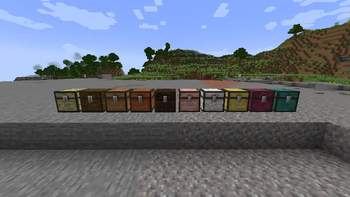
Extra Chests
Overview
Adds a chest and a trapped chest for every vanilla wood type, so your storage matches your builds.
Works like the normal chest (double chests too). Trapped versions send redstone when opened.
Minecraft 1.21.5
Beta Release
My excuse to practice block entity creation and texturing.
Features
- All woods covered: Oak, Spruce, Birch, Jungle, Acacia, Dark Oak, Mangrove, Cherry, Pale Oak, Bamboo, Crimson, Warped.
- Double chests: Place two of the same type side-by-side to form a large chest.
- Trapped chests: Emit redstone power based on how many players are viewing the chest.
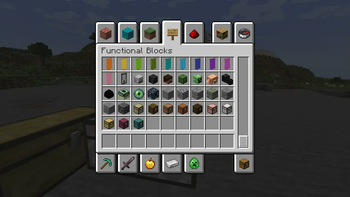
- Creative tabs:
- Chests → Functional Blocks
- Trapped Chests → Redstone Blocks
Installation
- Download the mod file for your game version.
- Install a compatible loader (Fabric or NeoForge).
- Put the mod file in your
modsfolder. - Launch the game.
Dependencies
- Fabric: Fabric API
- NeoForge: NeoForge
- Architectury API (multi-loader helper)
(Check the “Dependencies” section on Modrinth for exact files.)
Usage
- Place any wood chest as you would a normal chest.
- Place two of the same chest next to each other to make a double chest.
- Use the trapped versions when you want a redstone signal on open.
- Find them in the Creative tabs listed above.
FAQ
Does this change loot tables or world gen?
No. These are buildable/placeable blocks for your worlds and builds.
Server or client?
Both. Add it on the server and clients.
Future Additions
- I forgot boat chests exist
- Same with minecarts
- Other mod compatability?? idk
Quick facts
- Edition: Minecraft Java
- File type: .jar
- Minecraft versions listed: 26.1.2, 26.2
- How to install: Install the matching mod loader (Forge, Fabric or NeoForge) for your Minecraft version. → Download the .jar. → Put it in the .minecraft/mods folder and launch that loader profile.
- Where to get it: Opens on Modrinth — not every file is mirrored on our own servers.
Install steps are the general flow for this file type — How to install Minecraft Java mods & modpacks walks through it step by step.
Verified by MCModsHub
- Ships as extrachests-neoforge-26.1.2-1.0.2.jar — drop this file into the mods folder
- Download size: 1.1 MB
- Download link checked 5 Sept 2026 — working
These come from our own check of the pack file, not from the source page.