
DialogueUtils
Java mod listed for Minecraft 1.21. Downloads from the MC Java Mods app on Android.
A Pixelmon side mod that allows you to easily create helpful menus using Pixelmon's Dialogue, Choice Dialogue, and Input Dialogue screens
⬇ Download on Modrinth
DIALOGUEUTILS 1.2.1
This mod does not modify Pixelmon or its behavior.
For Support, contact @infidelrick on Discord
Dialogue Utils is a server-side mod using the PixelmonAPI for generating dialogues, choice menus, input screens, and notice overlays in-game.
FEATURES
- Simple Dialogues: Display basic text-based dialogues
- Choice Dialogues: Provide players with multiple options to choose from
- Input Dialogues: Allow players to input custom text with commands
- Notice System: Display various types of overlays including text, Pokémon, and items
- PlaceholderAPI Integration: Support for PlaceholderAPI in all dialogue and notice text
COMMANDS
SIMPLE DIALOGUE: /dutil simple <player> <title> <message>
Description: Display a simple dialogue box to the player.
Permissions Required: dialogueutil.simple
Example:
/dutil simple PlayerName "&eSafari Zone" &eGood Luck {player} &aCatch what you can before your timer runs out. Add more time with &e/safari buy #
CHOICE DIALOGUE: /dutil choice <player> <configId>
Description: Send a choice menu to a player using a pre-configured dialogue in dialogues.yml. Choices can be configured to run commands, have pokedollar costs, and/or permission requirements.
Permissions Required: dialogueutil.choice
Example:
/dutil choice PlayerName shop
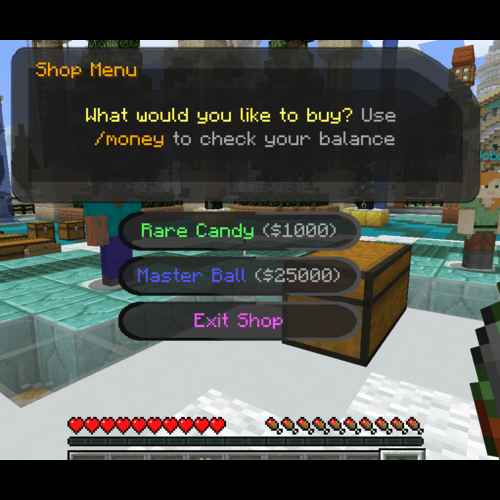
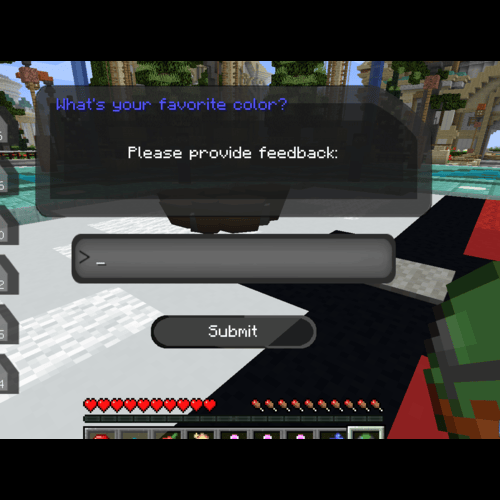
INPUT DIALOGUE: /dutil input player|console escape|stay <targetPlayer> <title> <message> <command>
Description: Create an input dialogue for the target player, allowing them to input text.
Options:
player|console: Execute the command as the player or the consoleescape|stay: Determine whether the menu closes when "Escape" is pressedtitle & message: Put in quotes if more than 1 wordcommand: Can use {player} and {input} for placeholders
Permissions Required:dialogueutil.input.playerordialogueutil.input.console
Example:
/dutil input player escape Player123 "&9What's your favorite color?" "Please provide feedback:" msg {player} {input} is a good choice!
NOTICE COMMANDS
The notice system allows you to display overlays with various types of content.
TEXT NOTICE: /dnotice direct text <player> <duration> <lines>
Description: Display a text-based notice overlay
Permissions Required: dialogueutil.notice.text
Example:
/dnotice direct text PlayerName 10 "&6Welcome!\n&eEnjoy your stay"
POKEMON NOTICE: /dnotice direct pokemon <player> <layout> <duration> <pokemon> <use3d> <lines>
Description: Display a notice with a Pokémon sprite or 3D model
Permissions Required: dialogueutil.notice.pokemon
Example:
/dnotice direct pokemon PlayerName LEFT_AND_RIGHT 10 "pikachu growth:ginormous" true "&6Special Pikachu!\n&eCheck it out"
ITEM NOTICE: /dnotice direct item <player> <layout> <duration> <lines> <itemWithNbt>
Description: Display a notice with an item
Permissions Required: dialogueutil.notice.item
Example:
/dnotice direct item PlayerName LEFT_AND_RIGHT 10 "&6Master Ball\n&eUltimate catching power" "pixelmon:poke_ball{PokeBallID:\"master_ball\"}"
NOTICE FROM CONFIG: /dnotice config <player> <configId>
Description: Display a pre-configured notice from notices.yml
Permissions Required: dialogueutil.notice.config
Example:
/dnotice config PlayerName welcome
OTHER NOTICE COMMANDS:
/dnotice hide- Hide the current notice/dnotice list- List available notice configurations/dnotice reload- Reload notice configurations/dnotice help- Show notice command help
RELOAD COMMANDS
/dutil reload- Reload dialogue configurations/dnotice reload- Reload notice configurations
CONFIGURATION FILES
config.yml
Controls general settings and default messages.
# Enable/Disable Debug messages
debug: false
messages:
  noMoney:
    title: "§cNot Enough Money"
    message: "§cYou need {price} to select this option!"
  noPermission:
    title: "§cPermission Error"
    message: "§cYou don't have permission: {permission}"
dialogues.yml
Define configurations for choice menus.
dialogues:
  shop:
    title: "&6Shop Menu"
    message: "&eWhat would you like to buy? &7Use &6/money &7to check your balance"
    choices:
      - text: "&aRare Candy &7($1000)"
        commands:
          - "[console]broadcast {player} got some candy"
          - "[console]give {player} pixelmon:rare_candy 1"
        price: 1000
        permission: "shop.rare_candy"
        failureTitle: "&cNo Permission"
        failureMessage: "&cYou need the &6shop.rare_candy &cpermission!"
notices.yml
Configure different types of notices.
notices:
  welcome:
    type: text
    duration: 10
    lines:
      - "&6&lWelcome to the server!"
      - "&eThank you for joining us"
      - "&aEnjoy your stay"

  professor_pikachu:
    type: pokemon
    layout: LEFT_AND_RIGHT
    duration: 12
    pokemon: "pikachu growth:ginormous form:phd"
    use3d: true
    lines:
      - "&6&lBalance:"
      - "&e%vault_eco_balance%"

  master_ball:
    type: item
    layout: LEFT_AND_RIGHT
    duration: 8
    item: "pixelmon:poke_ball"
    nbt: "{PokeBallID:\"master_ball\"}"
    name: "&dMaster Ball"
    lines:
      - "&6&lMaster Ball"
      - "&eThe ultimate Pokeball"
PERMISSIONS
Dialogue Permissions
dialogueutil.simple- Use simple dialoguesdialogueutil.choice- Use choice dialoguesdialogueutil.input.player- Use input dialogues as playerdialogueutil.input.console- Use input dialogues as consoledialogueutil.admin- Access administrative commands
Notice Permissions
dialogueutil.notice.text- Use text noticesdialogueutil.notice.pokemon- Use Pokémon noticesdialogueutil.notice.item- Use item noticesdialogueutil.notice.config- Use configured noticesdialogueutil.notice.admin- Access notice admin commands
DEPENDENCIES
- NeoForge: 21.1.172 or later
- Minecraft: 1.21.1
- Pixelmon: 9.3.16 or later
- PlaceholderAPI (Optional) - For placeholder support
- LuckPerms (Optional) - Give command access to non-op players
FEATURES & NOTES
- Color codes with & are supported in all text
- PlaceholderAPI placeholders are supported in all text (%placeholder%)
- Multiple notice layouts available: LEFT_AND_RIGHT, LEFT, RIGHT
- NBT data support for item notices
- Command execution after notice display
- Configurable duration for all notices
- 3D model support for Pokémon notices
- Edition: Minecraft Java
- File type: .jar
- Minecraft version listed: 1.21.1
- How to install: Install the matching mod loader (Forge, Fabric or NeoForge) for your Minecraft version. → Download the .jar. → Put it in the .minecraft/mods folder and launch that loader profile.
- Where to get it: Opens on Modrinth — not every file is mirrored on our own servers.
Install steps are the general flow for this file type — How to install Minecraft Java mods & modpacks walks through it step by step.
- Ships as dialogueutil-1.2.2.jar — drop this file into the mods folder
- Download size: 3.8 MB
- Download link checked 16 Oct 2026 — working
These come from our own check of the pack file, not from the source page.