
Create Cursor Fix
Fixes a gui rendering bug with Create on some linux distros. Guis may not reflect the true physical cursor position when opened.
⬇ Download on Modrinth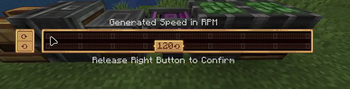
Create Cursor Fix
Small client-side NeoForge mod for Minecraft 1.21.1 that fixes stale cursor coordinates in Create value settings screens.
This issue shows up in any gui that is an instance of ValueSettingsScreen including Rotation Speed Controllers and Creative motors.
I do not intend to support other versions unless asked, but its pretty easy to port, so feel free to do so or request a particular version.
Requirements
- Minecraft 1.21.1
- NeoForge 21.1.219 or newer
- Create 6.0.9 or newer
What It Fixes
Create's value settings UI receives mouse coordinates from Minecraft's normal screen rendering path. On some Linux setups, those coordinates can be stale after Create programmatically moves the cursor.
This mod patches Create's value settings screen to read the current GLFW cursor position directly when rendering and saving the panel.
Wayland Support
Wayland is not explicitly supported.
This mod can fix the stale-coordinate case when cursor repositioning already works. That usually means x11 or xwayland, but I haven't been able to reliably prove this fixes anything outside of x11. Im a new modder, apologies.
Native Wayland seems to sometimes fail earlier than that. GLFW only supports
glfwSetCursorPos on Wayland while the cursor is disabled. Minecraft GUI
screens normally use a visible, enabled cursor, so a Wayland compositor may
refuse Create's attempt to move the cursor in the first place.
In that case there is no moved cursor position for this mod to read:
Create asks GLFW to move/snap the cursor
The Wayland compositor refuses or ignores that cursor move
The visible cursor never moves to the saved setting
This mod cannot infer the intended cursor position from GLFW
If the cursor does not visibly move to the saved value when opening the Create panel, that setup is probably outside this mod's support boundary.
- Edition: Minecraft Java
- File type: .jar
- Minecraft version listed: 1.21.1
- How to install: Install the matching mod loader (Forge, Fabric or NeoForge) for your Minecraft version. → Download the .jar. → Put it in the .minecraft/mods folder and launch that loader profile.
- Where to get it: Opens on Modrinth — not every file is mirrored on our own servers.
Install steps are the general flow for this file type — How to install Minecraft Java mods & modpacks walks through it step by step.
- Ships as create_cursor_fix-1.0.0.jar — drop this file into the mods folder
- Download size: 4 KB
- Download link checked 5 Sept 2026 — working
These come from our own check of the pack file, not from the source page.