


Forgot your password again? Have to think of a password for /register again? Well this mod fixes that.
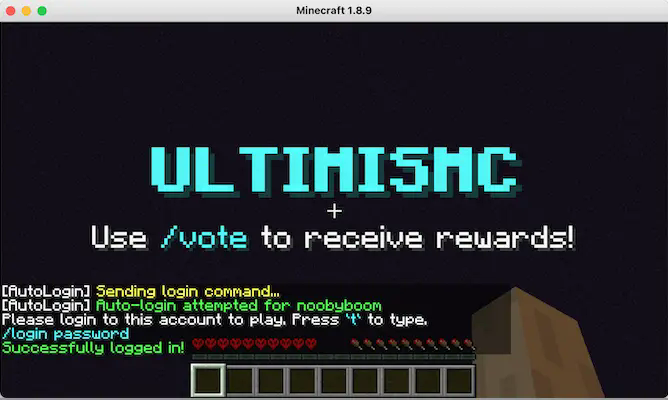
Features
• Auto Login Detection - Automatically detects login prompts and logs you in
• Password Storage - Saves your passwords per server/username combination (in plain text currently)
• Auto Registration - Generates random passwords when you need to register (configurable context + password length)
• Manual Commands - Use .autologin and .autoregister commands to manually register/login if auto detection failed or disabled
• Configurable Patterns - Customize login/register auto detection patterns (so it can work in a specific server)
Configuration
Setup
The mod creates a config/autologininfo folder in your Minecraft directory containing:
config.txt- All mod settings and patternsplayerstoredinfo.txt- password storage (server:username:password format)
Manual Commands:
.autologin- Forces immediate login attempt using saved password.autoregister- Forces immediate registration with new generated password
Configuration Options
Delay Settings:
usedelay=true/false- Enable/disable delay before auto-logindelayseconds=1- Seconds to wait before attempting login
Detection Patterns:
loginpattern="login"- Text to detect login promptsregisterpattern="register"- Text to detect registration promptsautodetectloginprompt=true/false- Enable auto-login detectionautodetectregister=true/false- Enable auto-registration detection
Command Formats:
commandformatlogin="/login $p"- Login command template ($p = password)commandformatregister="/register $p $p"- Register command template
Password Generation:
passwordlength=6- Length of generated passwordscontentpallet="abcdefghijklmnopqrstuvwxyz0123456789"- Characters to use
Behavior Controls:
disableonceloggedin=true/false- Stop checking after successful logindisableonceregistered=true/false- Stop checking after successful registrationshowdebugmessages=false- Enable/disable all mod messages in chat
Auto-Save:
autosave=true/false- Automatically save passwords from manual commands
- Edition: Minecraft Java
- File type: .jar
- Minecraft version listed: 26.1.2
- How to install: Install the matching mod loader (Forge, Fabric or NeoForge) for your Minecraft version. → Download the .jar. → Put it in the .minecraft/mods folder and launch that loader profile.
- Where to get it: Opens on Modrinth — not every file is mirrored on our own servers.
Install steps are the general flow for this file type — How to install Minecraft Java mods & modpacks walks through it step by step.
- Ships as autologinandregister-26.1.2-neoforge-2.1.0.jar — drop this file into the mods folder
- Download size: 51 KB
- Download link checked 6 Sept 2026 — working
These come from our own check of the pack file, not from the source page.