
Invariable Paintings: Crafting (legacy)
I don't know my version or loader
Note of Archival: I'm not happy with the balance changes this brings, and I can't think of a good way to enhance the concept in ways that haven't already been done since. As alternatives, consider using datapacks based on Craftable Painting Variants or Painting Selector instead.
Invariable Paintings: Crafting Recipes
This addon for Invariable Paintings contains the experimental crafting recipes that have since been removed from the base mod.
Different recipes presets are provided as built-in datapacks; each provides varying degrees of crafting freedom. You can manage them in the datapack menu when creating a new world, or using the /datapack command in already created worlds. None of these packs are enabled by default.
Cloning
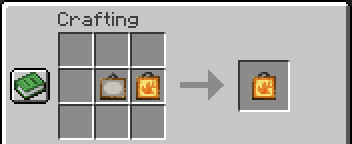
Paintings can be duplicated in the same way you would a banner or a book, by placing an empty one and a fileld one together in a crafting grid.
I am considering adding additional materials as cost (similarly to armour trims), but I'm not sure what expensive materials would feel appropriate. Suggestions are welcome.
Crafting with dyes
General rules
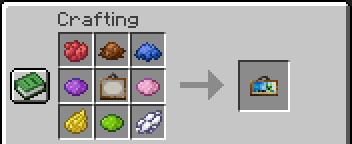
Filling a painting is done by combining it with one or more dyes of different colours. The colour of the dyes has no particular meaning. The correspondance between each combination and variant is semi-random; it will vary depending on the set of paintings you have installed, but should remain the same for a given set.
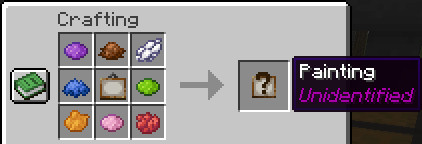
In most presets, the resulting painting is obfuscated until you take it out of the crafting table.
Provided datapacks:
Only one of these presets can be enabled at a time.
Unbound: The least restrictive crafting pack. Paintings can be crafted using any amount of dyes, using either a blank painting or an already filled one. This is the only pack were crafting results are not obfuscated.
Expensive: Crafting costs 8 different dies, and only accept Blank paintings as ingredients.
Iterative: Crafting only requires a single dye, thus only 16 different variants can be crafted from a blank canvas. More variants can be crafted by reusing filled paintings as ingredients. This will work better with more painting variants installed into the game.
Recycling: The most restrictive crafting pack. Blank paintings cannot be used as ingredients, making it impossible to craft filled paintings solely from raw materials. Your only option is to recycle another one acquired through other means. This will work better with cloning disabled.
- Edition: Minecraft Java
- File type: .jar
- Minecraft versions listed: 1.21, 1.21.1
- How to install: Install the matching mod loader (Forge, Fabric or NeoForge) for your Minecraft version. → Download the .jar. → Put it in the .minecraft/mods folder and launch that loader profile.
- Where to get it: Opens on Modrinth — not every file is mirrored on our own servers.
Install steps are the general flow for this file type — How to install Minecraft Java mods & modpacks walks through it step by step.
- Ships as invarpaint-crafting-legacy-1.0.1+1.21.jar — drop this file into the mods folder
- Download size: 132 KB
- Download link checked 6 Sept 2026 — working
These come from our own check of the pack file, not from the source page.