
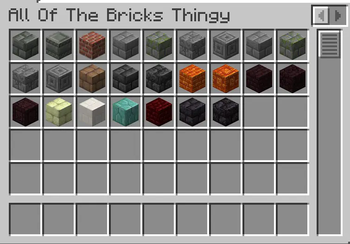
Create your own Custom Creative Tabs!
This is it, the mod we all needed, even if we didn't know it - has arrived.
How to use?
Well, it's easy!
Open the Creative Inventory
You will see a + button in the upper left corner. Click it.
Enter the required parameters - and there you have it!
Note: Due to Fabric limitations, the new Tabs will not be added until you restart your game.
Warning: This mod is currently in Early-ALPHA, and apart from not having all the features planned, it is also very unstable and may crash the game.
Quick facts
- Edition: Minecraft Java
- File type: .jar
- Minecraft versions listed: 1.21, 1.21.1, 1.21.2
- How to install: Install the matching mod loader (Forge, Fabric or NeoForge) for your Minecraft version. → Download the .jar. → Put it in the .minecraft/mods folder and launch that loader profile.
- Where to get it: Opens on Modrinth — not every file is mirrored on our own servers.
Install steps are the general flow for this file type — How to install Minecraft Java mods & modpacks walks through it step by step.
Verified by MCModsHub
- Ships as Custab-1.0a-1.21.x.jar — drop this file into the mods folder
- Download size: 227 KB
- Download link checked 6 Sept 2026 — working
These come from our own check of the pack file, not from the source page.