

The mod is simple, so I'll keep it short.
If you've tried currency mods before (Lightman's, Numismatic, etc), you'll usually run into the same problem: they don't work with all of your mods. Or they add a lot of extra systems, blocks, GUIs, and mechanics you don't actually want.
Hence, EZ Emerald Pouch.
No currencies.
No economy overhaul.
Just emeralds, done cleanly.
How it works:
-
Craft an Emerald Pouch
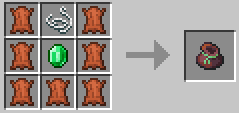
2. Store emeralds into your pouch:
- Picking up emeralds automatically stores them
- SHIFT + Right Click an Emerald or Emerald Block in your inventory to deposit it
The pouch stores an infinite amount of emeralds. Game logic, who cares. 🤷♀️
3. While trading (or whenever your inventory is open), click the Withdraw button to take out emeralds.
SHIFT + Click withdraws multiple stacks.
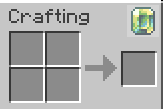
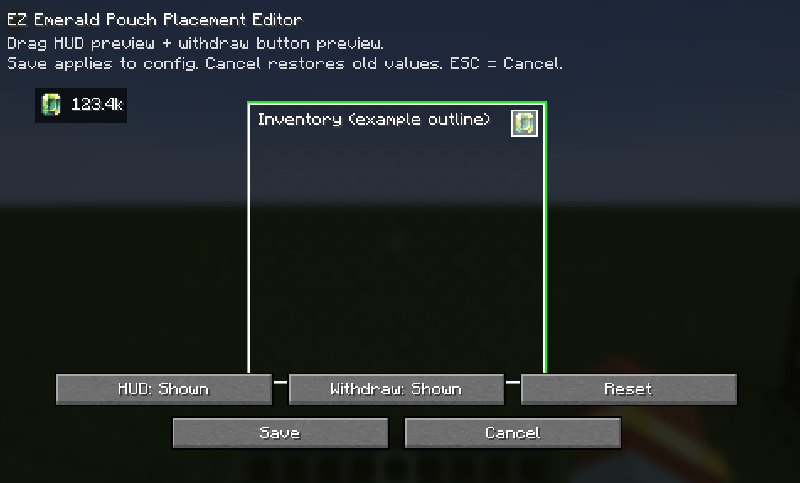
4. Press O to edit the GUI elements:
- Move the emerald counter
- Move the withdraw button
- Resize elements
- Hide or show elements
- Reset everything to defaults
All settings are client-side only.
Extra notes:
- Fully server-authoritative (no client-side emerald cheating)
- Optional Curios support (custom pouch slot)
- Designed to work alongside any mod that uses emeralds
That's it.
EZ Emerald Pouch does one thing — and stays out of your way.
Assets are made & owned by Glionox.
- Edition: Minecraft Java
- File type: .jar
- Minecraft version listed: 1.21.1
- How to install: Install the matching mod loader (Forge, Fabric or NeoForge) for your Minecraft version. → Download the .jar. → Put it in the .minecraft/mods folder and launch that loader profile.
- Where to get it: Opens on Modrinth — not every file is mirrored on our own servers.
Install steps are the general flow for this file type — How to install Minecraft Java mods & modpacks walks through it step by step.
- Ships as ezemeraldpouch-neoforge-1.21.1-1.0.3.3.jar — drop this file into the mods folder
- Download size: 77 KB
- Download link checked 6 Sept 2026 — working
These come from our own check of the pack file, not from the source page.