
InputForge
InputForge is a simple client-side Fabric mod for Minecraft 1.21.11 that adds basic input automation with a small on-screen HUD.
Features
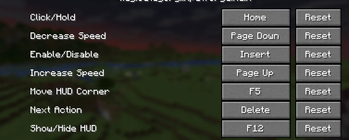
- Toggle the mod on or off
- Switch between
Clickmode andHoldmode - Cycle between
Left Click,Right Click, andPick Block - Increase or decrease CPS
- Show or hide the HUD
- Move the HUD between the four screen corners
HUD
The HUD displays:
- Whether the mod is enabled or disabled
- Current mode
- Current action
- Current CPS
The status line is green when enabled and red when disabled.
Important
This is a client-side utility mod. It does not need to be installed on the server, but server rules still apply. Only use it where automation is allowed.
Requirements
- Minecraft
1.21.11 - Fabric Loader
- Fabric API
- Java
21
Quick facts
- Edition: Minecraft Java
- File type: .jar
- Minecraft version listed: 1.21.11
- How to install: Install the matching mod loader (Forge, Fabric or NeoForge) for your Minecraft version. → Download the .jar. → Put it in the .minecraft/mods folder and launch that loader profile.
- Where to get it: Opens on Modrinth — not every file is mirrored on our own servers.
Install steps are the general flow for this file type — How to install Minecraft Java mods & modpacks walks through it step by step.
Verified by MCModsHub
- Ships as inputforge-1.0.2.jar — drop this file into the mods folder
- Download size: 1.2 MB
- Download link checked 6 Sept 2026 — working
These come from our own check of the pack file, not from the source page.