




Enchant Calculator

Find the cheapest way to combine enchantments. This mod calculates the optimal order to avoid wasting levels and hitting "too expensive" errors.
This mod is heavily inspired by the Enchantment Calculator mod created by FanyaOff. All credit goes to them for the original concept and design.
Overview
Enchant Calculator is a client-side mod that solves one of Minecraft's most annoying problems: combining multiple enchantments without wasting experience levels or hitting the anvil's "too expensive" limit.
When you place an item in an anvil, the mod automatically shows you exactly how to combine your enchantments in the most efficient order. No more guessing, no more wasted levels, and no more frustration.
Yes, i know the icon is AI, i suck at design..
How to Use
Step 1: Place your item in an anvil
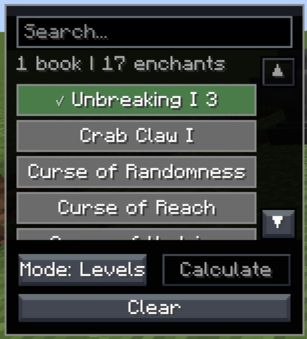
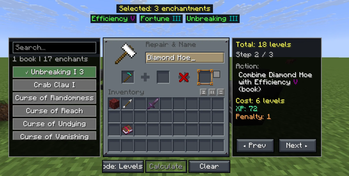
Two panels appear on the sides of your screen.
Step 2: Select enchantments from the left panel
The left panel displays all available enchantments you can add to your item. If you have enchanted books in your inventory, the mod shows which ones you have. Pick the enchantments you want and set their levels.
Step 3: Click Calculate
The mod instantly analyzes hundreds or thousands of possible combination orders to find the best one.
Step 4: Follow the steps
The right panel shows you the exact order to combine your items. Each step tells you what to put in the anvil and where. Use the arrow buttons to move between steps.
Optimization Modes
The mod offers three different ways to calculate the best order:
Levels Mode - Minimizes the total number of experience levels you spend. This is what most players want and is the default mode.
XP Mode - Minimizes the total experience points instead of levels. Because higher levels cost more XP per level, this mode sometimes gives different results than Levels mode.
Work Mode - Focuses on avoiding the "too expensive" error. When you want to add many enchantments to one item, the anvil can refuse to work because the cost is over 39 levels. This mode finds combinations that stay under the limit.
Switch between modes using the mode button. The mod recalculates instantly when you change modes.
Features
- Works with any enchantment in the game, including those from other mods
- Automatically detects enchanted books in your inventory
- Shows step by step instructions
- Tests all possible combination orders
- Three optimization modes
- Client-sided
- Responsive GUI that adapts to different GUI scales
GUI Scale Compatibility
The mod's interface should adapt to different GUI scales:
GUI Scale x4 and Below:
GUI Scale x5+:
Technical Details
The mod uses a smart algorithm to find the optimal combination order. For each set of enchantments you select, it generates all possible ways to combine them, calculates the cost for each way, and picks the cheapest one.
The algorithm accounts for:
- Enchantment rarity and level costs
- Prior work penalties from previous anvil uses
- The order items are placed in the anvil (left vs right slot)
- Compatibility between different enchantments (custom enchantment mods)
This means you always get the mathematically best solution for your chosen mode.
Requirements
Minecraft 1.21.8 Fabric Loader Fabric API
Compatibility
Works with Minecraft 1.21.8 on Fabric. Requires Fabric API.
- Edition: Minecraft Java
- File type: .jar
- Minecraft version listed: 1.21.8
- How to install: Install the matching mod loader (Forge, Fabric or NeoForge) for your Minecraft version. → Download the .jar. → Put it in the .minecraft/mods folder and launch that loader profile.
- Where to get it: Opens on Modrinth — not every file is mirrored on our own servers.
Install steps are the general flow for this file type — How to install Minecraft Java mods & modpacks walks through it step by step.
- Ships as enchantcalc-1.0.1.jar — drop this file into the mods folder
- Download size: 2.0 MB
- Download link checked 6 Sept 2026 — working
These come from our own check of the pack file, not from the source page.