JavAlert
Send native OS alerts and notifications to players! Perfect for trolling friends, server announcements, quest systems, and automated interactions. Alerts…
⬇ Download on ModrinthJavAlert
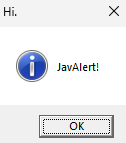
Send native OS alerts and notifications to players! Perfect for trolling friends, server announcements, quest systems, and automated interactions. Alerts appear outside the game as real system notifications on Windows, macOS, and Linux.
Full documentation: Wiki
Features
- Native System Notifications - Real OS notifications outside the game
- Message Boxes - Native dialog boxes (Windows, macOS, Linux)
- Custom In-Game Screens - Beautiful custom alert screens with buttons
- Alert Beacon Block - Automatically trigger alerts when players enter detection radius
- Conditional Triggers - Trigger based on inventory, stats, location, biome, and more
- Templates - Save and reuse alert configurations
- Multi-Language Support - English, Spanish, French, German
- API Integration - Comprehensive API for mod developers
Quick Start
- Place an Alert Beacon block in your world
- Right-click to configure radius, message, and display type
- Set trigger mode (ENTER, EXIT, STAY, PROXIMITY, PORTAL)
- Add conditions and filters (optional)
- Save and players will receive alerts automatically!
Commands
/alert <target> simple <message>- Simple alert/alert <target> messagebox <title> <message>- Messagebox alert/alert <target> notification <message>- Notification alert/alert <target> customscreen <title> <primaryButton> [secondaryButton] <message>- Custom screen/alert manage- Management GUI (OP Level 5)/alert documentation- In-game documentation
API for Mod Developers
See API Documentation.
Installation
- Download
JavAlert-1.2.jarfrom Modrinth - Place in your
modsfolder - Restart Minecraft
Configuration
Access configuration via the "JavAlert Config" button on the main menu (icon next to Singleplayer button).
Documentation
Complete documentation: Wiki
- Getting Started
- Alert Beacon Guide
- Conditions and Filters
- Templates
- Commands
- API Documentation
- Troubleshooting
You can also use /alert documentation in-game for interactive documentation.
Technical Details
- Minecraft: 1.20.1
- Forge: 47.4.13+
- Java: 17+
- License: All Rights Reserved
Developer note :
This is my first Minecraft mod, so i am just testing things with this mod and other mods are coming soon !
- Edition: Minecraft Java
- File type: .jar
- Minecraft version listed: 1.21.1
- How to install: Install the matching mod loader (Forge, Fabric or NeoForge) for your Minecraft version. → Download the .jar. → Put it in the .minecraft/mods folder and launch that loader profile.
- Where to get it: Opens on Modrinth — not every file is mirrored on our own servers.
Install steps are the general flow for this file type — How to install Minecraft Java mods & modpacks walks through it step by step.
- Ships as JavAlert-RELEASE-NeoForge-1.21.1-1.2.jar — drop this file into the mods folder
- Download size: 248 KB
- Download link checked 6 Sept 2026 — working
These come from our own check of the pack file, not from the source page.