
Vinyl
Custom music discs for Better than Adventure!
IMPORTANT NOTES
- This mod uses
yt-dlpto download audio!- If you're on singleplayer, you must have
yt-dlpinstalled to use Vinyl. - If you're running a server with Vinyl, you must have
yt-dlpinstalled on the server, but it is not required for connecting clients.
- If you're on singleplayer, you must have
- When used on a server, Vinyl will send audio files from server to client.
- If you trust the server host this should be completely fine. If not, this is something you should at least be aware of before you use Vinyl.
How to use
Put any music disc in a Blast Furnace to get a blank disc.


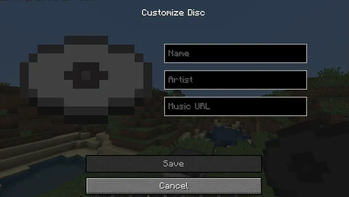
Right click with the disc in hand to set the name, artist, and URL to download from.

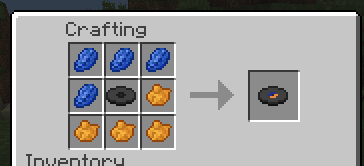
Add dye to colour the disc! (only one pattern supported at the moment, but I may add more)

Right click a Vinyl Press whilst holding the disc. When it's done pressing, right click again to take it out.

Enjoy your new custom music disc in a Jukebox! You can also use it as a Note Block sound by putting the disc in a chest underneath the Note Block!

Quick facts
- Edition: Minecraft Java
- File type: .jar
- Minecraft version listed: b1.7.3
- How to install: Install the matching mod loader (Forge, Fabric or NeoForge) for your Minecraft version. → Download the .jar. → Put it in the .minecraft/mods folder and launch that loader profile.
- Where to get it: Opens on Modrinth — not every file is mirrored on our own servers.
Install steps are the general flow for this file type — How to install Minecraft Java mods & modpacks walks through it step by step.
Verified by MCModsHub
- Ships as vinyl-1.0.1-7.3_04.jar — drop this file into the mods folder
- Download size: 602 KB
- Download link checked 6 Sept 2026 — working
These come from our own check of the pack file, not from the source page.