
Command Popup
This mod adds a pop-up where you can add buttons to execute commands, this pop-up can be dragged outside the game window, ideal for streaming!
⬇ Download on Modrinth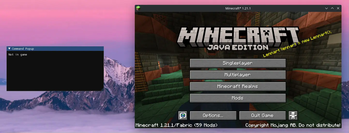
Command Popup
REQUIRES: https://modrinth.com/mod/imgui-mc/version/1.21.1-1.0.7 As well as modmenu / cloth config
This mod adds a pop-up where you can add buttons to execute commands, this pop-up can be dragged outside the game window, ideal for streaming!
How to use
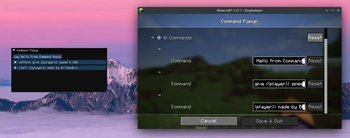
Open the mod menu. Here you can add commands (make sure to expand everything).
If you want a command button for each player you can use {{player}} and {{scoreboard_player}}.
For example:
/tp @s {{player}}/spectate {{scoreboard_player}}
etc.
- Edition: Minecraft Java
- File type: .jar
- Minecraft version listed: 1.21.1
- How to install: Install the matching mod loader (Forge, Fabric or NeoForge) for your Minecraft version. → Download the .jar. → Put it in the .minecraft/mods folder and launch that loader profile.
- Where to get it: Opens on Modrinth — not every file is mirrored on our own servers.
Install steps are the general flow for this file type — How to install Minecraft Java mods & modpacks walks through it step by step.
- Ships as command_popup-1.2.jar — drop this file into the mods folder
- Download size: 58 KB
- Download link checked 6 Sept 2026 — working
These come from our own check of the pack file, not from the source page.