
MCUtilities
A Comprehensive Utility Mod for Minecraft
MCUtilities is an all-in-one, server-side utility mod that brings essential quality-of-life features to Minecraft. It's designed for administrators, moderators, and players alike, providing a wide range of features including moderation tools, entity and item management, vein mining, and customizable notifications — all while keeping the Minecraft experience vanilla-friendly.
✨ Key Features:
🔨 Moderation Tools
- Kick, ban, tempban, mute, unban, playerlist, banlist, and mutelist.
- Configurable moderation limits and fallback OP levels.
- LuckPerms integration and fallback rank permissions.
⚒️ Entity & Item Management
- Clear entities in a configurable radius with custom filters (items, mobs, XP, etc.).
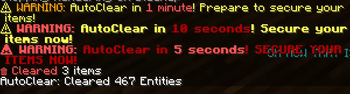
- Toggleable auto-clear scheduler with customizable intervals.
⛏️ Vein Mining
- Mine connected blocks efficiently with smart block detection.
- Multiple mining modes (Normal, Staircase, Tunnel).
- Customizable vein groups (stone, dirt, grass, etc.).
📃 Whitelist System
- Easily manage your whitelist with add, remove, and list commands.
- Permissions-based access for safe management.
📨 Player Notifications
- Flexible notification system with customizable output (action bar, chat, or off).
/mcnotifycommand for on-the-fly changes.
🛠️ Highly Configurable
clear-item-config.json: Customize auto-clear behavior and blacklists.moderation_config.json: Control moderation settings, time limits, and fallback OP levels.player_notifications.json: Tailor notifications to your server’s style.veinmine_config.json: Define block groups and vein mining behavior.
🧭 Permissions Overview
- LuckPerms support with fine-grained permissions.
- Rank-based moderation (
owner,admin,moderator,helper). - Configurable tempban limits per rank.
🚀 Coming Soon
- 🧲 Magnet System
- 🔒 Claim System
💬 Support & Feedback
Have questions or suggestions? Join our Discord community: https://discord.gg/DybchyqNgD
Quick facts
- Edition: Minecraft Java
- File type: .jar
- Minecraft version listed: 1.21.8
- How to install: Install the matching mod loader (Forge, Fabric or NeoForge) for your Minecraft version. → Download the .jar. → Put it in the .minecraft/mods folder and launch that loader profile.
- Where to get it: Opens on Modrinth — not every file is mirrored on our own servers.
Install steps are the general flow for this file type — How to install Minecraft Java mods & modpacks walks through it step by step.
Verified by MCModsHub
- Ships as mc-utilities-1.1.3+1.21.8.jar — drop this file into the mods folder
- Download size: 133 KB
- Download link checked 6 Sept 2026 — working
These come from our own check of the pack file, not from the source page.