
Arcane Hand
I don't know my version or loader


NOTICE: Arcane Hand is no longer being maintained in favor of the Arcanity mod.

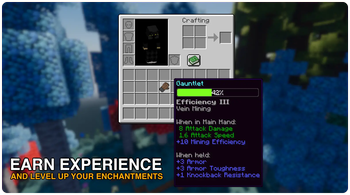
Arcane Hand is a mod that adds a new item, the Gauntlet. The Gauntlet is a multi-tool that serves as a weapon, pickaxe, axe, shovel, and hoe, all in one. Unlike most tools in Minecraft, the Gauntlet cannot be enchanted inside an Enchanting Table. Instead, you must use the new Arcane Console.

The Arcane Console allows you to select any enchantment you desire, allowing you to enable and disable enchantments as needed. After selecting an enchantment, you must level it up with experience.
There are four new enchantments added specifically for the Gauntlet:
- Abundance: Similar to Fortune and Looting. Causes mobs and blocks to have a chance to drop more loot. (Max Levels: 3)
- Blaze: Sets mobs on fire and also smelts the drops of blocks. (Max Levels: 1)
- Collect: When mining, items will be collected directly into your inventory. (Max Levels: 1)
- Excavate: When mining, you will mine in a 3x3 area. (Max Levels: 1)
- Vein Mining: When mining, matching connected blocks will also be broken. (Max Levels: 1)

To use a selected enchantment, you must level it up with experience. Hold the gauntlet and pick up experience orbs to level up your enchantments. If you have several enchantments selected, one will be chosen at random to progress.
While hovering over a Gauntlet, you can scroll to view the experience progression for your enchantments.

Gauntlets can be dyed by combining them with dye(s). Using a dyed gauntlet on a cauldron containing water removes any dye from it.
Permissions
✅ You may use this mod in modpacks.
✅ You may create add-ons, extensions, or companion mods.
✅ You may submit pull requests to contribute to the code.
❌ You may not publish this mod or modified versions anywhere without explicit permission.
- Edition: Minecraft Java
- File type: .jar
- Minecraft versions listed: 1.21.9, 1.21.10
- How to install: Install the matching mod loader (Forge, Fabric or NeoForge) for your Minecraft version. → Download the .jar. → Put it in the .minecraft/mods folder and launch that loader profile.
- Where to get it: Opens on Modrinth — not every file is mirrored on our own servers.
Install steps are the general flow for this file type — How to install Minecraft Java mods & modpacks walks through it step by step.
- Ships as arcanehand-1.0.7-1.21.10.jar — drop this file into the mods folder
- Download size: 201 KB
- Download link checked 6 Sept 2026 — working
These come from our own check of the pack file, not from the source page.