
ModsJava
XPStats
Java mod listed for Minecraft 1.21. Downloads from the MC Java Mods app on Android.
Adds a keybind that replaces your XP Bar and toggles through useful PVP stats like your exact HP (decimal precision), gapple count and many useful infos
⬇ Download on Modrinth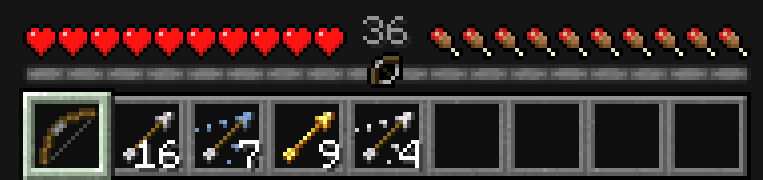
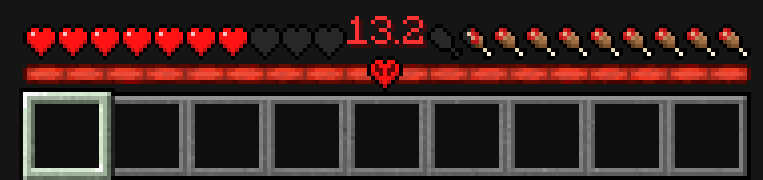
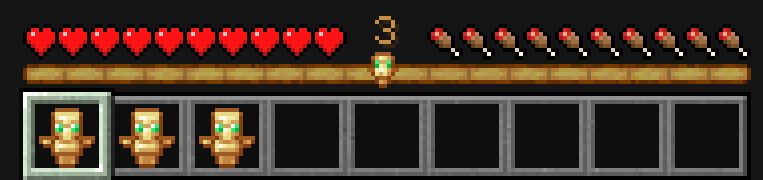

A clean, toggleable PvP overlay that replaces your XP bar with precise, real-time combat stats.
⚡ Features
🔁 Toggleable Overlay (Keybind)
- Fully customizable keybind in controls:
- Cycle keybind that cycles between following different modes
- Keybinds for each mode that switches to that exact mode instantly (unset by default)
❤️ Exact Health Display
- Shows precise HP
- Smart formatting:
- ≥ 3 HP → 1 decimal (e.g. 17.4)
- < 3 HP → 2 decimals (e.g. 2.87)
🍎 Gapple Counter
- Tracks number of golden apples in your inventory
🌀 Totem Counter
- Tracks number of totems of undying in your inventory
🏹 Arrow Counter
- Tracks number of arrows in your inventory
ㅤ
🖼️ UI Design
🧾 Minimal & Clean UI
- Seamlessly replaces the XP bar
- Doesn’t clutter your screen
- Designed for competitive PvP
🎯 PvP-Focused
- Only shows info you actually need
- No useless visual spam
⚙️ Technical Details
- Built for Fabric
- Lightweight, no performance impact
- Client-side only
- Uses Minecraft HUD rendering
Quick facts
- Edition: Minecraft Java
- File type: .jar
- Minecraft versions listed: 1.21.9, 1.21.10, 1.21.11
- How to install: Install the matching mod loader (Forge, Fabric or NeoForge) for your Minecraft version. → Download the .jar. → Put it in the .minecraft/mods folder and launch that loader profile.
- Where to get it: Opens on Modrinth — not every file is mirrored on our own servers.
Install steps are the general flow for this file type — How to install Minecraft Java mods & modpacks walks through it step by step.
File checked by MCModsHub
- Ships as xp-stats_1.21.9-1.21.11.jar — drop this file into the mods folder
- Download size: 27 KB
- Download link checked 17 Oct 2026 — working
These come from our own check of the pack file, not from the source page.