
🕒 RealTimeClockUz – Multi Time HUD Clock UZ, EN, RU
O'zbek
🕒 RealTimeClockUz – Multi Time HUD soati
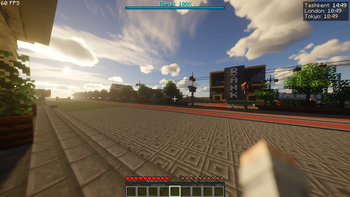
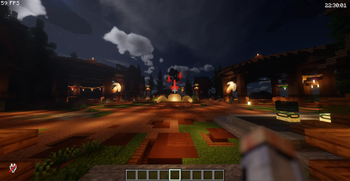
RealTimeClockUz — bu Minecraft uchun Fabric client mod bo‘lib, o‘yin ichida bir nechta real vaqt zonalarini (multi-time) HUD’da ko‘rsatadi. Endi siz bir vaqtning o‘zida turli davlatlar vaqtini kuzatishingiz mumkin.
Misol:
Tashkent: 21:30
London: 17:30
Tokyo: 01:30
version license
⚙ Texnik talablar (minimal)
- Minecraft 1.20.1+ (latest gacha qo‘llab-quvvatlanadi)
- Fabric Loader
- Fabric API
- ModMenu
- Cloth Config
✨ Asosiy imkoniyatlar
- ✅ Bir nechta vaqt zonalarini HUD’da ko‘rsatadi
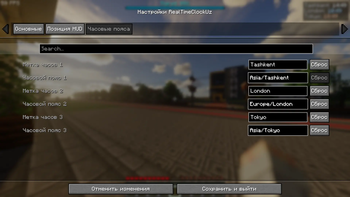
- ✅ Default zonalar:
- Asia/Tashkent
- Europe/London
- Asia/Tokyo
- ✅ Vaqt zonalarni qo‘shish / o‘chirish mumkin
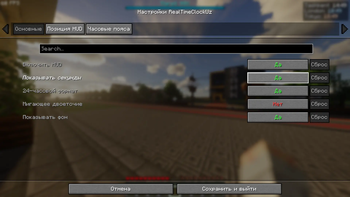
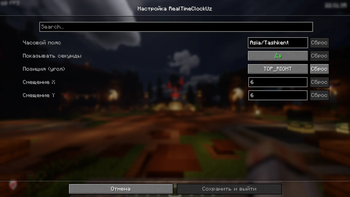
- ✅ ModMenu orqali to‘liq sozlash
- ✅ 12h / 24h format tanlash
- ✅ Soniyalarni yoqish / o‘chirish
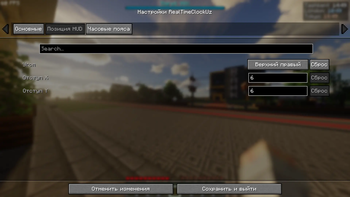
- ✅ HUD joylashuvini sozlash (4 burchak)
- ✅ X / Y offset sozlamalari
- ✅ Har bir vaqt uchun custom nom berish mumkin
- ✅ Lokalizatsiya qo‘llab-quvvatlanadi:
- O'zbek
- English
- Русский
🛠 O‘rnatish
- Fabric Loader o‘rnating
- Fabric API o‘rnating
- ModMenu o‘rnating
- Cloth Config o‘rnating
RealTimeClockUz.jarfaylini mods/ papkaga joylashtiring- O‘yinni ishga tushiring
⚙ Sozlamalar
Mod avtomatik quyidagi config faylni yaratadi:
config/realtimeclock.json
Bu yerda quyidagilarni sozlash mumkin:
- Timezone ro‘yxati
- HUD joylashuvi
- X / Y offset
- 12h / 24h format
- Soniyalarni ko‘rsatish
Shuningdek sozlamalarni ModMenu orqali o‘yin ichida ham o‘zgartirish mumkin.
🚀 Qo‘shimcha imkoniyatlar
- ⚡ Har bir vaqt alohida qatorda chiqadi
- ⚡ Sekundiga 1 marta yangilanadi (lag yo‘q)
- ⚡ Yengil va optimallashtirilgan
❓ Yordam
Savol yoki muammo bo‘lsa:
📬 Telegram: @SarvarGamer_YT
🧑💻 Muallif
👨💻 Developer: SarvarDev
📜 Litsenziya
MIT License – litsenziyasi bo'yicha litsenziyalangan.
English
🕒 RealTimeClockUz – Multi Time HUD Clock
RealTimeClockUz is a lightweight Fabric client-side mod that allows you to display multiple real-world timezones on the Minecraft HUD at the same time.
Example:
Tashkent: 21:30
London: 17:30
Tokyo: 01:30
version license
⚙ Technical Requirements (Minimum)
- Minecraft 1.20.1+ (up to latest)
- Fabric Loader
- Fabric API
- ModMenu
- Cloth Config
✨ Main Features
- ✅ Displays multiple timezones on the HUD
- ✅ Default timezones:
- Asia/Tashkent
- Europe/London
- Asia/Tokyo
- ✅ Add / remove timezones dynamically
- ✅ Full ModMenu configuration
- ✅ 12h / 24h format toggle
- ✅ Optional seconds display
- ✅ Configurable HUD position (4 corners)
- ✅ X / Y offset settings
- ✅ Custom labels for each timezone
- ✅ Localization support:
- Uzbek
- English
- Russian
🛠 Installation
- Install Fabric Loader
- Install Fabric API
- Install ModMenu
- Install Cloth Config
- Put
RealTimeClockUz.jarinto your mods/ folder - Launch the game
⚙ Configuration
The mod automatically creates:
config/realtimeclock.json
You can configure:
- Timezone list
- HUD position
- X / Y offset
- 12h / 24h format
- Seconds display
All settings can also be changed via ModMenu in-game.
🚀 Extra Features
- ⚡ Each timezone is displayed on a separate line
- ⚡ Updates once per second (optimized)
- ⚡ Lightweight and performance-friendly
❓ Support
If you have any questions or issues:
📬 Telegram: @SarvarGamer_YT
🧑💻 Author
Developer: SarvarDev
📜 License
MIT License – Licensed under MIT License.
- Edition: Minecraft Java
- File type: .jar
- Minecraft versions listed: 1.20.1, 1.20.2, 1.20.3
- How to install: Install the matching mod loader (Forge, Fabric or NeoForge) for your Minecraft version. → Download the .jar. → Put it in the .minecraft/mods folder and launch that loader profile.
- Where to get it: Opens on Modrinth — not every file is mirrored on our own servers.
Install steps are the general flow for this file type — How to install Minecraft Java mods & modpacks walks through it step by step.
- Ships as realtimeclockuz-1.1.2.jar — drop this file into the mods folder
- Download size: 33 KB
- Download link checked 7 Sept 2026 — working
These come from our own check of the pack file, not from the source page.