
Lightmap Texture Viewer / Dumper
Adds a debug command to display the lightmap or gui items atlas to the screen, also allows the lightmap to be dumped to a texture
⬇ Download on Modrinth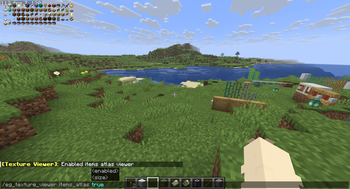
Texture Viewer
**Note: This mod will not be updated to 26.1 or above as this functionality is now part of vanilla minecraft. You can toggle the lightmap in vanilla with F3 + 4 ** Adds a debug command that displays the lightmap and gui items atlas for debugging purposes. As of v1.1, also allows the lightmap to be dumped to a texture using the F3 + S keybind
Run /eg_texture_viewer <viewer name> <boolean> to enable or disable the viewers, alternatively you can use /eg_texture_viewer <viewer name> <int> to change the size. <viewer name> can be either lightmap or items_atlas
The items_atlas viewer will only show when an item is currently being rendered in a gui. This is not the same thing as the block/item texture atlas, its mainly just part of this mod as I was curious how it looked ingame
- Edition: Minecraft Java
- File type: .jar
- Minecraft version listed: 1.21.11
- How to install: Install the matching mod loader (Forge, Fabric or NeoForge) for your Minecraft version. → Download the .jar. → Put it in the .minecraft/mods folder and launch that loader profile.
- Where to get it: Opens on Modrinth — not every file is mirrored on our own servers.
Install steps are the general flow for this file type — How to install Minecraft Java mods & modpacks walks through it step by step.
- Ships as eg_texture_viewer-1.2.jar — drop this file into the mods folder
- Download size: 26 KB
- Download link checked 7 Sept 2026 — working
These come from our own check of the pack file, not from the source page.