
TecnoMap
Integrate https://mappa.tecnocraft.net/ with your Minecraft instance to show your real-time position and server markers on a web map.
⬇ Download on Modrinth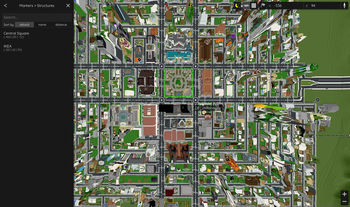
TecnoMap
TecnoMap integrates mappa.tecnocraft.net with your Minecraft client, displaying your real-time position and server-defined markers on a web-based map.
Features
Real-Time Position
Your current in-game location is displayed live on the map.
Markers
Several key locations are marked and visible on the map, including:
- Parco Centrale
- Legione Carabinieri "Chiaffredo Bergia"
- Palazzo Sant'Ayama
- Palazzo di Giustizia
- Banca
- Scuola
- Caserma Vigili del Fuoco "Alberto Giombini"
- and much more
How It Works
TecnoMap starts a lightweight HTTP REST server inside the Minecraft client on http://localhost:8998. It exposes:
- Real-time player coordinates
- The markers (static and dynamic)
These are accessed by the browser extension, which allows the map at mappa.tecnocraft.net to display your location and markers.
Browser Extension
To allow the map website to communicate with the local server, a browser extension is required.
Firefox:
Available on the official store:
https://addons.mozilla.org/en-US/firefox/addon/tecnomap-extension/Chrome (and other Chromium browsers):
Must be installed manually due to Chrome Web Store fees:
Download latest releaseSource Code:
Extension branch on GitHub
Requirements
- Minecraft 1.20.1 with Fabric installed
- TecnoMap mod file placed in your
modsfolder - The browser extension installed in your preferred browser
Preview

- Edition: Minecraft Java
- File type: .jar
- Minecraft version listed: 1.20.1
- How to install: Install the matching mod loader (Forge, Fabric or NeoForge) for your Minecraft version. → Download the .jar. → Put it in the .minecraft/mods folder and launch that loader profile.
- Where to get it: Opens on Modrinth — not every file is mirrored on our own servers.
Install steps are the general flow for this file type — How to install Minecraft Java mods & modpacks walks through it step by step.
- Ships as tecnomap-1.2.0.jar — drop this file into the mods folder
- Download size: 28 KB
- Download link checked 7 Sept 2026 — working
These come from our own check of the pack file, not from the source page.