
SleepTimer
I don't know my version or loader
⏰ SleepTimer
🌟 Main features
📊 Instant information (H key)
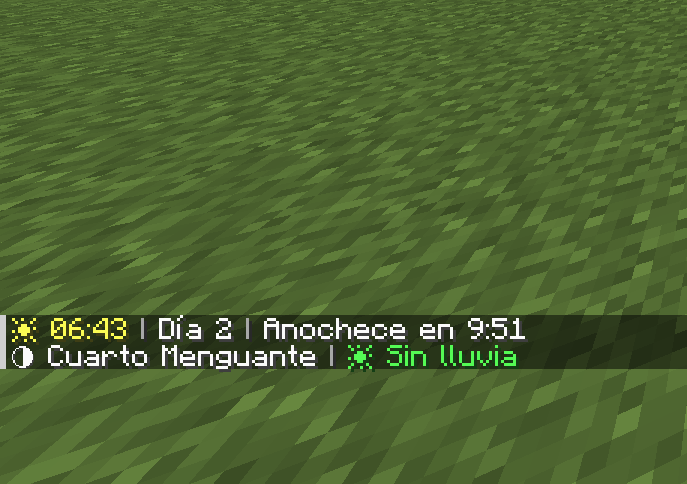
Press H at any time to see:
- ⏰ Current time in 24-hour format (e.g., 2:30 p.m.)
- 📅 Day of the world (e.g., Day 5)
- 🌅 Time until sunset/sunrise (e.g., Sunset in 3:42)
- 🌙 Current moon phase (Full Moon, First Quarter, New Moon, etc.)
- 💧 Rain/storm duration (e.g., Raining for 2:15)
🛏️ Smart bed timer
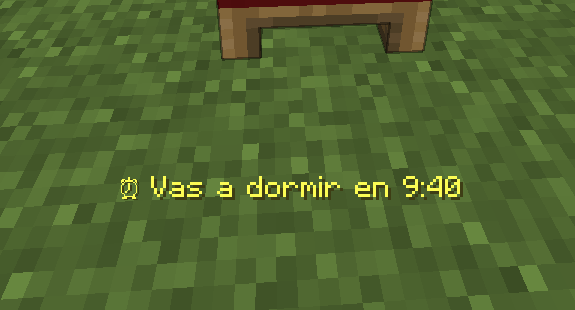
When you click on a bed during the day, a message appears indicating exactly how long it will be before you can sleep (e.g., “⏰ You can sleep in 4:23”)
⚠️ Automatic alerts
- Nightfall: Alert 1 minute before nightfall
- Sunrise: Notification when it is safe to go out
- Optional sounds: Bells accompanying alerts
✏️ 100% customizable messages
Don't like the default messages? Change them!
- Write your own texts for each alert
- Use color codes (§e=yellow, §a=green, §c=red, §b=blue, §6=orange)
- Use %s to insert the time wherever you want
Examples:
§e⏰ You can sleep in %s→ “⏰ You can sleep in 3:42”§cGo to bed in %s!→ “Go to bed in 3:42!”§b%s left to dream→ “3:42 left to dream”
⚙️ Fully configurable
Open the configuration menu from:
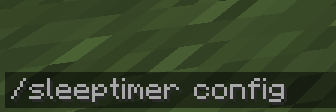
- Command:
/sleeptimer config - Mods menu: Mods → SleepTimer → ⚙️ Config
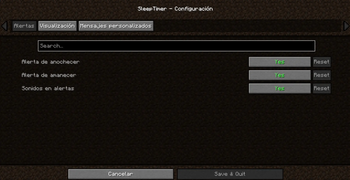
Category: Alerts
| Option | Description |
|---|---|
| Sunset alert | Notification 1 minute before sunset |
| Sunrise alert | Notification at sunrise |
| Alert sounds | Play sound with alerts |
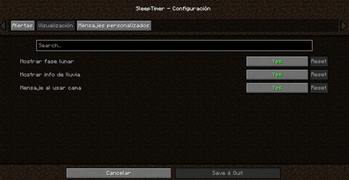
Category: Display
| Option | Description |
|---|---|
| Show moon phase | View moon phase when pressing H |
| Show rain info | View rain time when pressing H |
| Message when using bed | Show sleep time when clicking on bed |
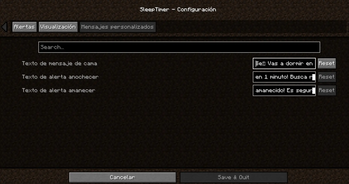
Category: Custom messages
| Option | Description |
|---|---|
| Bed message text | Customize the message when using the bed (use %s for the time) |
| Sunset alert text | Customize the sunset alert |
| Sunrise alert text | Customize the sunrise alert |
⌨️ Customizable key
Don't like the H key? Change it easily:
- Go to Options → Controls
- Find the “SleepTimer” category
- Click on the current key
- Press the new key you prefer
🌍 Multilingual
Fully translated into 13 languages:
| Language | Code |
|---|---|
| 🇪🇸 Spanish | es_es |
| 🇬🇧 English | en_us |
| 🇫🇷 French | fr_fr |
| 🇩🇪 German | de_de |
| 🇵🇹 Portuguese (Brazil) | pt_br |
| 🇮🇹 Italian | it_it |
| 🇯🇵 Japanese | ja_jp |
| 🇷🇺 Russian | ru_ru |
| 🇨🇳 Chinese (Simplified) | zh_cn |
| 🇰🇷 Korean | ko_kr |
| 🇵🇱 Polish | pl_pl |
| 🇹🇷 Turkish | tr_tr |
| 🇳🇱 Dutch | nl_nl |
The mod automatically detects your Minecraft language.
📦 Installation
- Install Fabric Loader
- Download Fabric API
- Download SleepTimer
- Place both mods in the
.minecraft/modsfolder - Enjoy!
ℹ️ Note: Cloth Config API is included in the mod, you don't need to download it separately.
🎮 Requirements
| Requirement | Version |
|---|---|
| Minecraft | 1.20.1-1.20.6 |
| Fabric Loader | 0.18.4+ |
| Fabric API | Latest version |
🎨 Available color codes
For use in your custom messages:
| Code | Color |
|---|---|
| §0 | Black |
| §1 | Dark blue |
| §2 | Dark green |
| §3 | Cyan |
| §4 | Dark red |
| §5 | Purple |
| §6 | Orange |
| §7 | Gray |
| §8 | Dark gray |
| §9 | Blue |
| §a | Green |
| §b | Light blue |
| §c | Red |
| §d | Pink |
| §e | Yellow |
| §f | White |
Formats:
| Code | Effect |
|---|---|
| §l | Bold |
| §o | Italic |
| §n | Underline |
| §m | Strikethrough |
| §r | Reset format |
📸 Screenshots
Information when pressing H

Bedtime message

Settings menu


🐛 Report bugs
Found a problem?
- Write to me on Discord: Tracats787
- Describe the problem and how to reproduce it
📜 License
This mod is open source under the CC0-1.0 license.
🙏 Credits
- Developer: Tracats787
- Configuration API: Cloth Config by shedaniel
❤️ Do you like the mod?
- 💚 Like it on Modrinth/CurseForge
- 📢 Share it with your friends!
- Edition: Minecraft Java
- File type: .jar
- Minecraft versions listed: 1.21.4, 1.21.5, 1.21.6
- How to install: Install the matching mod loader (Forge, Fabric or NeoForge) for your Minecraft version. → Download the .jar. → Put it in the .minecraft/mods folder and launch that loader profile.
- Where to get it: Opens on Modrinth — not every file is mirrored on our own servers.
Install steps are the general flow for this file type — How to install Minecraft Java mods & modpacks walks through it step by step.
- Ships as sleeptimer-1.0.0.jar — drop this file into the mods folder
- Download size: 1.2 MB
- Download link checked 7 Sept 2026 — working
These come from our own check of the pack file, not from the source page.