
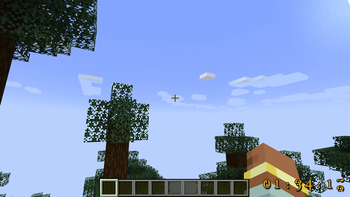
This mod allows one to set pretty-looking resource pack customizable countdown on Minecraft screen. And plays scary sounds when an Hour passes, on last 30 minutes, last 10 minutes and when countdown is over.
Why? Well, if you're a streamer and accepted a kind of challenge in Minecraft, you must be wanting to set some kind of countdown. Well, this is just one of possible applications. I'm mostly sure, you can come up with more :)
Usage:
Config file is named countdown-client.toml. It stores screen position and current value of timer.
Use the following commands in-game to set various properties:
/cd add [SECONDS|MINUTES|HOURS]
- adds a value to timer
/cd set
- sets timer to specified value in seconds
/cd start
- starts countdown
/cd stop
- stops countdown
/cd reset
- reset timer to zero
/cd setposition <left|right> <top|bottom>
- sets countdown position on screen. Use negative values to align countdown to bottom-right.
You can download a Photoshop template to customize how timer looks (or just create a 256x256 transparent image and align digits from 1, 2 ... 9, 0, semicolon (:) in 64x80 pattern)
Your suggestions are welcome!
- Edition: Minecraft Java
- File type: .jar
- Minecraft version listed: 1.20.2
- How to install: Install the matching mod loader (Forge, Fabric or NeoForge) for your Minecraft version. → Download the .jar. → Put it in the .minecraft/mods folder and launch that loader profile.
- Where to get it: Opens on Modrinth — not every file is mirrored on our own servers.
Install steps are the general flow for this file type — How to install Minecraft Java mods & modpacks walks through it step by step.
- Ships as countdown-1.20.2-1.0.0.jar — drop this file into the mods folder
- Download size: 409 KB
- Download link checked 7 Sept 2026 — working
These come from our own check of the pack file, not from the source page.