
Container Data Dumper
Copy container and inventory data as Data Components directly to your clipboard - works with any container block or entity in Minecraft 1.20-1.21+
⬇ Download on Modrinth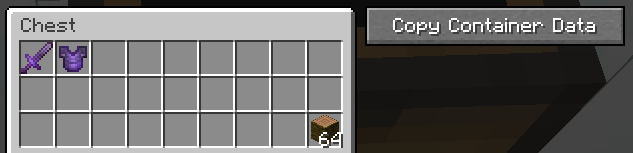
Container Data Dumper



Concept
This mod allows you to easily copy the contents of containers (like Chests, Barrels, Shulker Boxes, etc.) in the form of Data Components (SNBT) directly to your clipboard. It adds a convenient "Copy" button to the container UI, making it perfect for developers, technical players, or anyone who needs to extract inventory data.
The mod works with any block or entity that has a container inventory - including Chests, Barrels, Shulker Boxes, Hoppers, Furnaces, Brewing Stands, Chest Boats, Hopper Minecarts, and more.
Version Compatibility & Data Format
Supported Versions: Minecraft 1.20 - 1.21.11
⚠️ Important Note on Data Format
This mod always outputs item data using the Data Components format (introduced in Minecraft 1.20.5).
- If you are playing on Minecraft 1.21+, this is the standard format.
- If you are playing on Minecraft 1.20 - 1.20.4 (in which NBT is the standard format), the mod will still output Data Component format (it does NOT convert from the older NBT structure - it directly generates the modern format).
This ensures that the output is consistent and future-proof, regardless of which version you are currently using to capture the data.
Note on Slot Indices: This mod uses Storage/NBT indices (not GUI indices) for slot numbers. This is the correct format for use in commands, datapacks, and NBT data. For more information about the difference between GUI and Storage indices, see the Slot Index Documentation.
Output Example
Here is an example of what the copied data looks like (Data Components format):
[
  {
    "slot": 0,
    "item": {
      "id": "minecraft:netherite_sword",
      "count": 1,
      "components": {
        "minecraft:enchantments": {
          "minecraft:unbreaking": 3
        }
      }
    }
  },
  {
    "slot": 1,
    "item": {
      "id": "minecraft:netherite_chestplate",
      "count": 1,
      "components": {
        "minecraft:enchantments": {
          "minecraft:unbreaking": 3
        }
      }
    }
  },
  {
    "slot": 26,
    "item": {
      "id": "minecraft:jungle_log",
      "count": 1
    }
  }
]
Usage Tip for 1.20.5+
IMPORTANT: Due to chat character limitations, the data copied by this mod is often too long to be pasted directly into the chat window when used in commands.
You typically MUST use a Command Block to execute commands with this data.
Usage Example
To give yourself a chest containing the dumped data, use the following syntax in a command block:
/give @a chest[container=<PASTE_YOUR_COPIED_DATA_HERE>]
This images may also help:
This converts to:
[
  {
    "slot": 0,
    "item": {
      "id": "minecraft:netherite_sword",
      "count": 1,
      "components": {
        "minecraft:enchantments": {
          "minecraft:unbreaking": 3
        }
      }
    }
  },
  {
    "slot": 1,
    "item": {
      "id": "minecraft:netherite_chestplate",
      "count": 1,
      "components": {
        "minecraft:enchantments": {
          "minecraft:unbreaking": 3
        }
      }
    }
  },
  {
    "slot": 26,
    "item": {
      "id": "minecraft:jungle_log",
      "count": 64
    }
  }
]
- Edition: Minecraft Java
- File type: .jar
- Minecraft versions listed: 1.20, 1.20.1, 1.20.2
- How to install: Install the matching mod loader (Forge, Fabric or NeoForge) for your Minecraft version. → Download the .jar. → Put it in the .minecraft/mods folder and launch that loader profile.
- Where to get it: Opens on Modrinth — not every file is mirrored on our own servers.
Install steps are the general flow for this file type — How to install Minecraft Java mods & modpacks walks through it step by step.
- Ships as ContainerDataDumper-1.20-1.21.11-1.0.0.jar — drop this file into the mods folder
- Download size: 12 KB
- Download link checked 7 Sept 2026 — working
These come from our own check of the pack file, not from the source page.