


QuickMark


A Minecraft Fabric mod that brings Fortnite's marker and team HUD system to Minecraft.
📥 Installation
For Players
- Install Fabric Loader (0.14.0+) for Minecraft 1.21.7+
- Install the Fabric API (0.16.14+)
- Download the latest version of Quickmark from Modrinth
- Place the
.jarfile into yourmodsfolder
For Servers
- Fabric Server: Simply add the QuickMark mod to the
modsfolder. - Spigot/Paper (Recommended): For optimal performance and compatibility, install the QuickMark Plugin into the
pluginsfolder. The mod will automatically switch to plugin-based communication.
Usage
Marker System
- Single mouse wheel click — place a normal marker
- Double mouse wheel click — place a danger marker


Markers sync automatically across your team and play sound notifications.
Team Management
Invite players:
/qm invite <player>
Leave the team:
/qm leave
Accepting Invitations
When you receive an invite, a notification will appear. Press Y (default key, customizable in Minecraft's Controls menu) to accept.
Team HUD
When you're in a team, a HUD appears showing the health of all teammates.

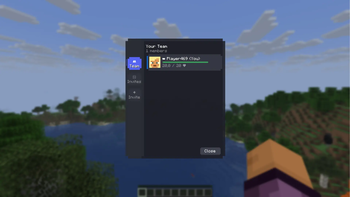
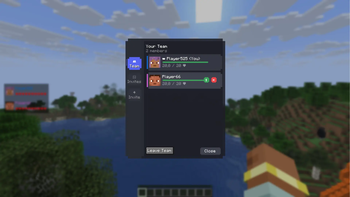
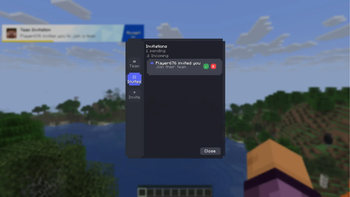
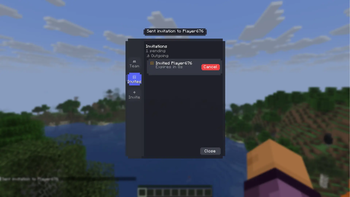
GUI
Main tab:
The main tab with teammates:
The invitations tab:
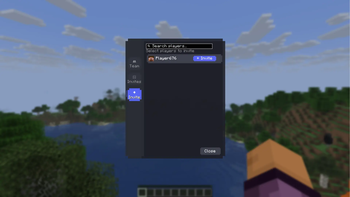
The incoming invitations tab:
The outgoing invitations tab:
🛠️ For Server Administrators
QuickMark uses two communication methods:
- Via Plugin (Recommended) — Offers the best performance and reliability. Download the plugin here.
- Via Chat (Fallback) — If the plugin is not found, the mod uses chat messages prefixed with
quickmark://.
⚠️ Crucial for Fallback Mode: If you are not using the server plugin, ensure that your chat or anti-cheat plugins do not filter or remove messages starting with quickmark://, as this will break the mod's team and marker synchronization.
Known Issues
- The problem with leaving the team (the status is not updated on one of the sides).
- The Leave Team button appears in the GUI for the leader.
- The marker icon experience a slight positional offset from the exact center of the crosshair, depending on the camera's pitch and yaw.
Plans
- Some overlays from Fortnite (similar to the invitation overlay)
⭐ Inspiration
The mod is inspired by Fortnite’s intuitive marker system, designed to enhance team coordination and communication in Minecraft.
🚀 Contributing
Pull Requests are welcome! Please feel free to submit issues and contributions on our GitHub repository.
For development setup, clone the repo and run ./gradlew build.
- Edition: Minecraft Java
- File type: .jar
- Minecraft versions listed: 1.21.7, 1.21.8, 1.21.9
- How to install: Install the matching mod loader (Forge, Fabric or NeoForge) for your Minecraft version. → Download the .jar. → Put it in the .minecraft/mods folder and launch that loader profile.
- Where to get it: Opens on Modrinth — not every file is mirrored on our own servers.
Install steps are the general flow for this file type — How to install Minecraft Java mods & modpacks walks through it step by step.
- Ships as QuickMark-2.0.jar — drop this file into the mods folder
- Download size: 259 KB
- Download link checked 7 Sept 2026 — working
These come from our own check of the pack file, not from the source page.