
RealTime HUD
A simple and customizable mod that displays your real-world system time on your Minecraft HUD.
Features
✨ Real-time clock display on your HUD
📍 Four position presets (Top Left, Top Right, Bottom Left, Bottom Right)
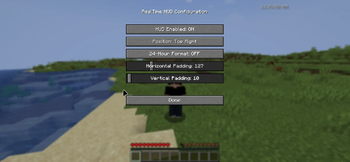
🎨 Adjustable horizontal and vertical padding
🕐 Toggle between 24-hour and 12-hour format
⌨️ Convenient keybindings (R to toggle, F to change format)
⚙️ Easy configuration via Mod Menu
💾 Settings persist between game sessions
Quick previews


Requirements
- Minecraft 1.21.x
- Fabric Loader 0.16.0+
- Fabric API
- Mod Menu (recommended)
Keybindings
- R - Toggle HUD on/off
- F - Switch between 24h/12h format
- Or configure everything via Mod Menu!
Configuration
Access the config screen through Mod Menu to customize:
- Screen position
- Padding adjustments
- Time format preference
MIT License
Copyright (c) 2024 drevenant7
Permission is hereby granted, free of charge, to any person obtaining a copy...
- Edition: Minecraft Java
- File type: .jar
- Minecraft versions listed: 1.21, 1.21.1, 1.21.2
- How to install: Install the matching mod loader (Forge, Fabric or NeoForge) for your Minecraft version. → Download the .jar. → Put it in the .minecraft/mods folder and launch that loader profile.
- Where to get it: Opens on Modrinth — not every file is mirrored on our own servers.
Install steps are the general flow for this file type — How to install Minecraft Java mods & modpacks walks through it step by step.
- Ships as realtimehud-1.0-SNAPSHOT.jar — drop this file into the mods folder
- Download size: 1.2 MB
- Download link checked 7 Sept 2026 — working
These come from our own check of the pack file, not from the source page.