
Creative Crafting Grid
Java mod listed for Minecraft 26.x. Downloads from the MC Java Mods app on Android.
I don't know my version or loader
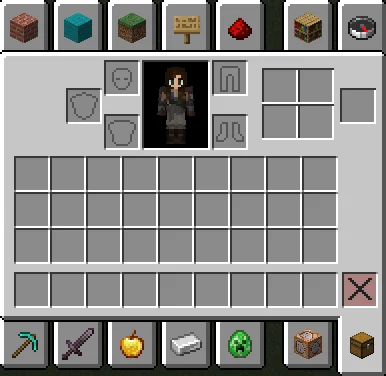
Add the survival crafting slots to the creative inventory screen. These slots are shown in all gamemodes except creative. They are generally only used in survival and adventure mode, however, their contents are tracked and can be modified by the server. Some players may find it useful to be able to view and interact with these slots even when in creative mode, which this mod allows.
Creative Crafting Grid will now prevent the client from moving items from the crafting grid back into the player's inventory when closing the inventory. Toggle this functionality on or off with /creativecrafting sticky [true|false], view the current configuration with /creativecrafting sticky.
- Edition: Minecraft Java
- File type: .jar
- Minecraft versions listed: 26.1, 26.1.1, 26.1.2
- How to install: Install the matching mod loader (Forge, Fabric or NeoForge) for your Minecraft version. → Download the .jar. → Put it in the .minecraft/mods folder and launch that loader profile.
- Where to get it: Opens on Modrinth — not every file is mirrored on our own servers.
Install steps are the general flow for this file type — How to install Minecraft Java mods & modpacks walks through it step by step.
- Ships as creativecrafting-0.4.2.jar — drop this file into the mods folder
- Download size: 13 KB
- Download link checked 18 Oct 2026 — working
These come from our own check of the pack file, not from the source page.