





What is the Drop Prevent mod? 🦐
Ever dropped your sword in the middle of a fight? Or accidentally thrown a shulker box straight into lava?
This mod protects you from mistakes like that!
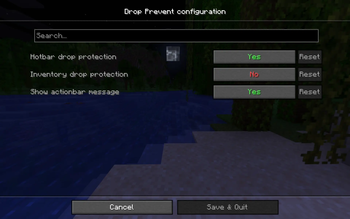
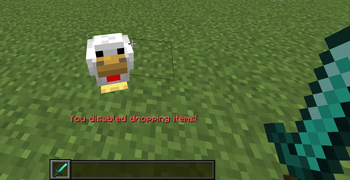
It disables the drop key for selected inventory slots, preventing accidental item drops during normal gameplay. By default, it protects items in your hotbar. You can also enable protection for the entire inventory. Items can still be removed intentionally by dragging them out of the inventory screen.
Configuration
Click to showFeatures
- Hotbar Drop Protection – Blocks dropping items from the hotbar (enabled by default)
- Inventory Drop Protection – Blocks dropping items from the entire inventory (disabled by default)
- Show actionbar message - Shows a warning message when attempting to drop items while protection is enabled (enabled by default)
To configure mod, click Esc -> Mods -> Drop Prevent
Configuration file: .../config/dropPrevent.json
Requirements
- Java 21 or higher
- Fabric 0.16.9 or higher
- Minecraft 1.21.11 (26.1 is currently not supported)
- Fabric API and Mod Menu
- Edition: Minecraft Java
- File type: .jar
- Minecraft version listed: 1.21.11
- How to install: Install the matching mod loader (Forge, Fabric or NeoForge) for your Minecraft version. → Download the .jar. → Put it in the .minecraft/mods folder and launch that loader profile.
- Where to get it: Opens on Modrinth — not every file is mirrored on our own servers.
Install steps are the general flow for this file type — How to install Minecraft Java mods & modpacks walks through it step by step.
- Ships as dropprevent-1.0.1.jar — drop this file into the mods folder
- Download size: 232 KB
- Download link checked 7 Sept 2026 — working
These come from our own check of the pack file, not from the source page.