


BundleUI
A small client-side Fabric mod that fixes the vanilla bundle tooltip preview cap.
Overview
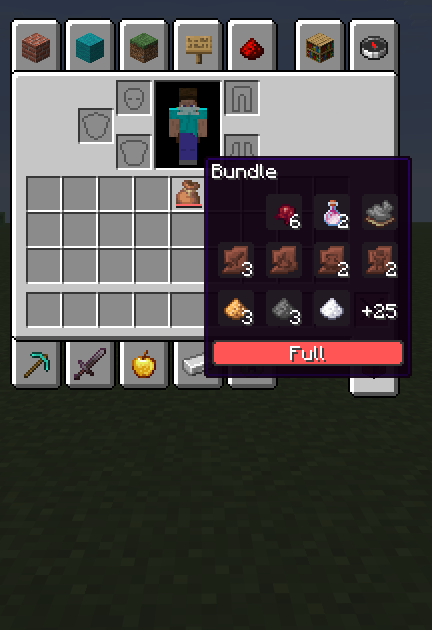
BundleUI improves the vanilla bundle tooltip in Minecraft 1.21.11 by removing the default preview limit.
When hovering a bundle, the tooltip keeps the vanilla slot grid, selection highlight styling, and progress bar, but renders every stored stack instead of cutting the preview short.
Features
- Shows all stored bundle contents in the tooltip
- Keeps the vanilla bundle tooltip style
- Preserves the vanilla slot grid and highlight visuals
- Keeps the vanilla progress bar
- Lightweight and focused on one simple fix
- Client-side only
Design Goals
BundleUI is meant to fix a vanilla UI limitation without changing how bundles work.
It does not touch bundle storage, item behavior, gameplay balance, or server logic. The goal is to keep the vanilla look and behavior intact while making the tooltip actually useful.
Supported Platform
- Fabric
- Yarn mappings
- Minecraft 1.21.11
Notes
- Client-side only
- Does not modify bundle mechanics
- Does not affect servers
- Keeps vanilla behavior intact
- Focused on a single clean quality-of-life improvement
License
MPL-2.0
Summary
BundleUI keeps the vanilla bundle tooltip style, but removes the pointless preview cap so you can actually see everything inside.
- Edition: Minecraft Java
- File type: .jar
- Minecraft version listed: 1.21.11
- How to install: Install the matching mod loader (Forge, Fabric or NeoForge) for your Minecraft version. → Download the .jar. → Put it in the .minecraft/mods folder and launch that loader profile.
- Where to get it: Opens on Modrinth — not every file is mirrored on our own servers.
Install steps are the general flow for this file type — How to install Minecraft Java mods & modpacks walks through it step by step.
- Ships as bundleui-1.0.0.jar — drop this file into the mods folder
- Download size: 17 KB
- Download link checked 7 Sept 2026 — working
These come from our own check of the pack file, not from the source page.