DigiLights
Java mod listed for Minecraft 1.20. Downloads from the MC Java Mods app on Android.
⬇ Download on Modrinth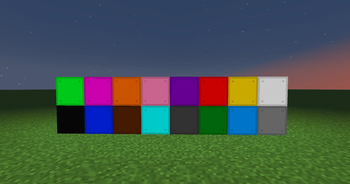
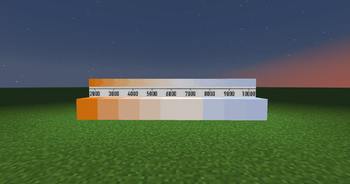
DigiLights provides simple colored lights for your builds. Cheap, simple crafting recipes, and a wide variety of colors and styles.
To start, make a white lamp:
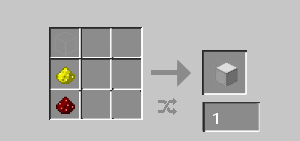
White Lamp recipe: glass, redstone dust, glowstone dust.
(See the gallery for all the available blocks.)
To make a lamp smooth, "sand" it with sand!
To un-smooth a lamp, beat it with rocks! (Craft it with a cobblestone.)
To invert a lamp, just put it back in the crafting table.
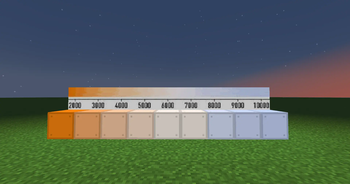
To make a blackbody/color temperature lamp, craft a White Lamp with an Iron Nugget.
To warm a blackbody lamp, add up to 8 torches with it in a crafting table (down to 2000K)
To cool a blackbody lamp, add up to 8 snowballs with it (up to 10000K)
This is version 1.0, and was made for a private SMP. More is planned in the future!
- Edition: Minecraft Java
- File type: .jar
- Minecraft version listed: 1.20.1
- How to install: Install the matching mod loader (Forge, Fabric or NeoForge) for your Minecraft version. → Download the .jar. → Put it in the .minecraft/mods folder and launch that loader profile.
- Where to get it: Opens on Modrinth — not every file is mirrored on our own servers.
Install steps are the general flow for this file type — How to install Minecraft Java mods & modpacks walks through it step by step.
- Ships as digilights-1.0.0-forge-1.20.1.jar — drop this file into the mods folder
- Download size: 1.3 MB
- Download link checked 18 Oct 2026 — working
These come from our own check of the pack file, not from the source page.