
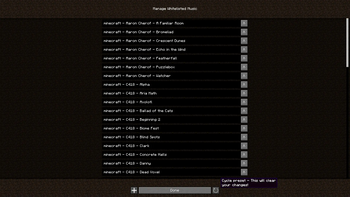
'Mute Copyrighted Audio' creates a whitelist so that players can only play music that they have approved. This could be useful for content creators who worry about the possibility that their videos may be copyright struck.
Presets can be cycled through in the 'Music & Sounds' options panel.
I cannot, and will not guarantee that it will prevent anyones content using copyrighted audio from being copyright claimed. Forge/Quilt versions are planned, but not currently being worked on. Additional languages will be up to the community to assist in translations.
Mod Menu is optional, but required for advanced customizations to the whitelist.
I hereby grant permission to do whatever you want with 'Mute Copyrighted Audio'.
- Edition: Minecraft Java
- File type: .jar
- Minecraft version listed: 1.20.1
- How to install: Install the matching mod loader (Forge, Fabric or NeoForge) for your Minecraft version. → Download the .jar. → Put it in the .minecraft/mods folder and launch that loader profile.
- Where to get it: Opens on Modrinth — not every file is mirrored on our own servers.
Install steps are the general flow for this file type — How to install Minecraft Java mods & modpacks walks through it step by step.
- Ships as MuteCopyrightedAudio-1.0.01+1.20.1.jar — drop this file into the mods folder
- Download size: 60 KB
- Download link checked 7 Sept 2026 — working
These come from our own check of the pack file, not from the source page.