
KeyBinds Profiles Simplified
Java mod listed for Minecraft 1.21. Downloads from the MC Java Mods app on Android.
Effortlessly save, load, and manage multiple keybind configurations without ever leaving the game. Perfect for switching between PvP, Parkour, and casual…
⬇ Download on Modrinth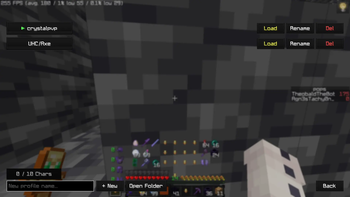
⌨️ Simple Keybind Profiles
Simple Keybind Profiles is a lightweight, client-side Fabric mod designed for players who need to switch between different control schemes instantly. Whether you are jumping from a high-intensity Crystal PvP match to a casual SMP session, this mod ensures your keys are always exactly where you need them.
🚀 Features
- Unlimited Profiles: Create and save multiple keybind configurations for different gamemodes (UHC, Crystal, Pot, Creative, etc.).
- Instant Switching: Load your favorite profiles with a single click from the GUI or via a quick chat command.
- Easy Sharing: Use the "Open Folder" button to find your
.jsonprofile files. Swap them with friends or backup your settings effortlessly. - In-Game Management: Create, rename, and delete profiles directly within the Minecraft UI—no need to restart your game.
- Mod Menu Integration: Fully compatible with Mod Menu. Access your profiles directly from your mod list.
🛠 How to Use
- Open the Profile Screen (via Mod Menu or your designated keybind).
- Type a name in the box and click + New to save your current in-game bindings.
- Click Load on any saved profile to apply it instantly.
- Use
/keybindconfigs <name>if you prefer using the chat console!
📂 Portability
All profiles are stored in .minecraft/keybind-configs/. To share a setup, simply send the JSON file to a friend, and they can drop it right into their folder!
Technical Details
- Platform: Fabric
- Environment: Client-side only
- Version: Minecraft 1.21.1+
Developed by Ka1denz.
- Edition: Minecraft Java
- File type: .jar
- Minecraft version listed: 1.21.11
- How to install: Install the matching mod loader (Forge, Fabric or NeoForge) for your Minecraft version. → Download the .jar. → Put it in the .minecraft/mods folder and launch that loader profile.
- Where to get it: Opens on Modrinth — not every file is mirrored on our own servers.
Install steps are the general flow for this file type — How to install Minecraft Java mods & modpacks walks through it step by step.
- Ships as simple-keybind-profiles-1.0.0-RELEASE+1.21.11.jar — drop this file into the mods folder
- Download size: 29 KB
- Download link checked 18 Oct 2026 — working
These come from our own check of the pack file, not from the source page.