
Gloom
Java mod listed for Minecraft 1.20. Downloads from the MC Java Mods app on Android.
⬇ Download on Modrinth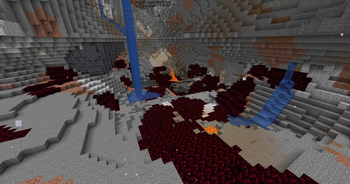
A WIP minecraft representation of the Tears of the Kingdom gloom functionalities and effects. This mod adds the infamous gloom from tears of the kingdom which has spread extensivly throughout the underground portions of the world. As a counter to the gloom you will also be able to find the Sundelion flower which can be brewed into a potion that can cure the gloom effect.
As a fair warning this project is being developed by a new modder that may or may not know what they are doing for the most part. There may be bugs and I will work to resolve these whenever I get the chance.
The main feature of this mod are the three status effects that are currently available.
The gloom effect currently reduces the player's max health and serves as a reminder to be causious underground, the effect is permenant unless countered with the refresh effect. The effect can primarily be obtained by stepping on gloom blocks
The refresh effect is the opposite of the gloom effect, it removes it and slowly restores the player's max health to it's original values. This effect can be obtainted by steping into an area that is exposed to the sky with an elevation above y = 40. The seond way to get this effect is by creating a potion of light using Sundelion petals and an awkward potion.
The third effect is malice, which is the lethal part of the gloom. This effect, similar to instant damage, hurts the player, but in tandom with gloom it will reduce the players max health. The effect can primarily be obtained by stepping on gloom blocks
- Edition: Minecraft Java
- File type: .jar
- Minecraft versions listed: 1.20.2, 1.20.3, 1.20.4
- How to install: Install the matching mod loader (Forge, Fabric or NeoForge) for your Minecraft version. → Download the .jar. → Put it in the .minecraft/mods folder and launch that loader profile.
- Where to get it: Opens on Modrinth — not every file is mirrored on our own servers.
Install steps are the general flow for this file type — How to install Minecraft Java mods & modpacks walks through it step by step.
- Ships as gloom-1.0.1.jar — drop this file into the mods folder
- Download size: 314 KB
- Download link checked 18 Oct 2026 — working
These come from our own check of the pack file, not from the source page.