
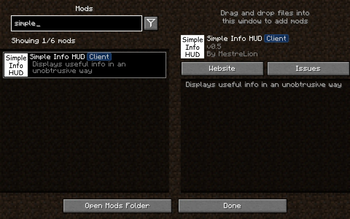
Simple Info HUD
Minecraft client-side mod for a simple HUD (Heads-on-Display) that shows coordinates, facing direction, world time and other in-game information in a consise format.
Designed to be an unbtrusive version of the F3 Debug screen, offering useful info in a single line.
Brief summary of the information displayed:
- Coordinates
- Direction
- World and real-life day time.
- Biome
- FPS
Valuable information in very little screen area!
[!NOTE]
- Requires Fabric and Fabric API
- Currently supports only Minecraft 1.16.4/1.16.5, as it was (re-)created for using in Skyblock 2.1. Support for all major versions up to latest is planned.
Usage and details
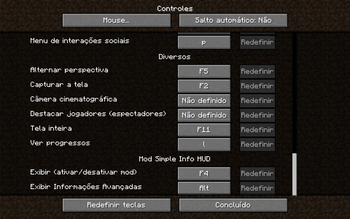
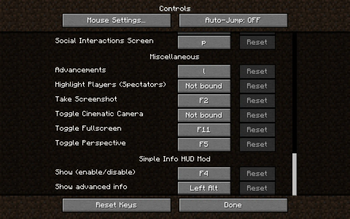
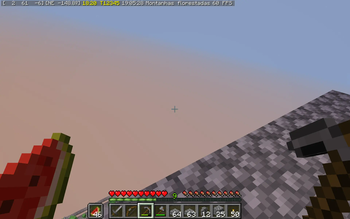
F4 cycles HUD display mode, configurable in Minecraft "Controls" setting. By default is displays:
- Coordinates:
[x y z],ybeing the altitude / layer. - Facing direction:
North,South,West,East,NW,NE,SW,SE.
Example:
[220 16 440] [NE]
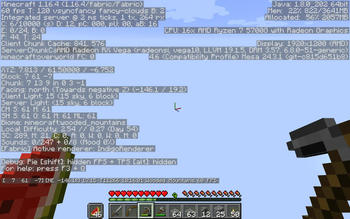
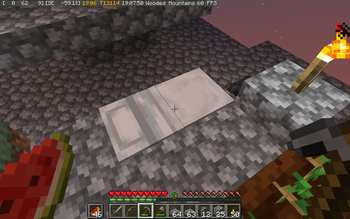
Pressing the display mode key once displays additional information:
- Exact facing angle, from
-180°to+180°at North.0°is South and+90°is East. - World time, in
HH:MMformat. To match the clock item, day starts at 6AM. Colors indicate some events during the sunset (dusk), night, and sunrise (dawn):18:00: Daytime ends and Sunset begins, Villagers go to their beds and sleep18:32: Beds can be used and undead mobs no longer burn19:11: Hostile mobs start spawning outdoors04:48: Hostile mobs stop spawning outdoors05:27: Beds can no longer be used, undead mobs begin to burn06:00: Sunrise ends and Daytime begins, Players and Villagers awaken and rise from their beds- The above timestamps are for clear/sunny weather. Rains and Thunderstorms extend bed usage, hostile mob spawning and no burning periods, so they start earlier and end later.
- Biome human-friendly name, translated to your current game language
Example:
[220 16 440] [NE +132.5°] 18:32 Jungle
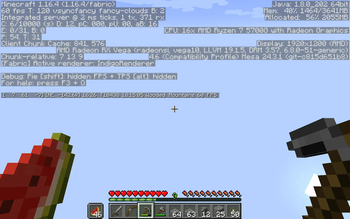
Pressing the key again displays more additional information:
- World day
- Exact world time in game ticks. A Minecraft Day lasts 24000 ticks.
- Real-life local time, in
HH:MM:SSformat. - Frames per second (FPS)
Example:
[220 16 440] [NE +132.5°] Day 123 18:32 T12542 21:52:45 Jungle 60 FPS
Press the key once more to disable the HUD, and again to cycle back to displaying simple information.
Installation
Using a pre-built jar:
- Install Fabric Loader in your Minecraft instance.
- Download the mod for your Minecraft version. Releases are found on Github Releases, Modrinth, and on Curseforge.
- Save the downloaded
.jarfile in themodsfolder of your Minecraft instance, by default~/.minecraftin Linux and%APPDATA%/.mineraftin Windows if you're using the official Minecraft Launcher from Microsoft. - Similar instructions can be found in this Fabric tutorial
- Note: Besides the Fabric Loader itself, this mod requires the Fabric API Mod, also available on CurseForge and GitHub Releases, so repeat the above steps for it.
- All the above can be greatly simplified using a launcher such as Prism Launcher
Compiling from source:
- Install Java JDK (not just the JRE!), preferably a modern release such as OpenJDK 21
- Clone this repository from Github
- Run
./gradlew buildin the cloned repository directory.
sudo apt install default-jdk
git clone https://github.com/MestreLion/SimpleInfoHUD.git
cd SimpleInfoHUD
./gradlew build
The resulting .jars are found at ./build/libs, and can be used to install the mod.
To-Do List
- Use more colors:
- Biome, Temperature, etc
- Altitude: blue for Sea Level, yellow/cyan/red for top Gold, Diamonds, Lava Lakes, etc
- Week/Moon phase.
- Allow basic customization, such as HUD position, size and color.
- Config file to persist display mode.
- Automatic publish on Modrinth, CurseForge and Github releases via Github actions
- Branches for distinct major Minecraft versions.
Wont-Do List
Add a ton of features or in-game customization options. There are better mods for that, including MiniHUD. The idea of Simple Info HUD is to keep it simple, consise, and provide good defaults. Plug and play, no need to tinker with.
Add Light Level. The Light Level of the single block you're standing on is almost useless, and coloring that light level can be misleading as mob spawn mechanics are very complex. Such info simply does not belong to a mere HUD, but to a proper Overlay displayed on the blocks themselves, such as MiniHUD's Light Level overlay or a dedicated mod like Shedaniel's Light Overlay.
Speaking of MiniHUD...
Why not MiniHUD?
MiniHUD, an amazing and well-known Mod by Masa, offers a very similar funcionality plus a ton of other features. So why Simple Info HUD even exists?
- First, Simple Info HUD predates MiniHUD. I've initially developed it for Minecraft
1.5.2(yes 5, not 15!) in 2013, and MiniHUD debuted only in 2016. - No support for aggregating different data in a single line. MiniHUD, by design, shows each information in its own line.
- No support for dynamic colors, such as Simple Info HUD's World Time changing colors throughout the day to indicate special events.
- No support for (correct) integer Coordinates. Using
%.0fto hide decimals will round the number, possily up, instead of properly truncating it down. This means a coordinate of1234.5will be displayed as1235, which is most likely not what you want. This is a Java limitation as it has no formatting option to truncate afloatto anint, so you need%.1fto show 1 decimal place as a workaround. Simple Info HUD uses integers for position coordinates, just like F3, and displays1234as intended.
Contributing
Patches and Pull requests are very welcome, specially for features in the To-Do list. Bug reports and suggestions and comments too! If you want to hack the code, the easiest way is to set up a development environment such as an IDE.
- Fabric has a great tutorial on setting up IntelliJ IDEA.
- You can also use any IDE of your choice, such as Microsoft Visual Studio Code, or none at all and use any bare text editor.
Credits and Disclaimer
This is a "reboot" of my first mod, made in 2013 for Minecraft 1.5.2/1.6.1.
It targeted ModLoader, possibly the oldest mod loader "platform", which Forge supported back then.
That ancient version is still available, for historical purposes, in the
modloader branch of this repository.
It served as the main reference when developing this updated version, check its
README for the original references and credits.
Created using Fabric's Template mod generator
Feel free to use, fork and contribute!
Copyright (C) 2024 Rodrigo Silva (MestreLion) <linux@rodrigosilva.com>

This program is free software: you can redistribute it and/or modify
it under the terms of the GNU General Public License as published by
the Free Software Foundation, either version 3 of the License, or
(at your option) any later version.

This program is distributed in the hope that it will be useful,
but WITHOUT ANY WARRANTY; without even the implied warranty of
MERCHANTABILITY or FITNESS FOR A PARTICULAR PURPOSE.  See the
GNU General Public License for more details.

You should have received a copy of the GNU General Public License
along with this program. See <http://www.gnu.org/licenses/gpl.html>
- Edition: Minecraft Java
- File type: .jar
- Minecraft versions listed: 1.16.4, 1.16.5
- How to install: Install the matching mod loader (Forge, Fabric or NeoForge) for your Minecraft version. → Download the .jar. → Put it in the .minecraft/mods folder and launch that loader profile.
- Where to get it: Opens on Modrinth — not every file is mirrored on our own servers.
Install steps are the general flow for this file type — How to install Minecraft Java mods & modpacks walks through it step by step.
- Ships as simple-info-hud-1.16.4-0.7.jar — drop this file into the mods folder
- Download size: 29 KB
- Download link checked 8 Sept 2026 — working
These come from our own check of the pack file, not from the source page.