
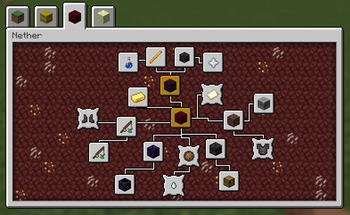
Features:
- Advancements can be clicked and dragged to freely change their position
- Set a fixed order for the advancement tabs to sort into
- Adjust the window size of the advancements screen
- Add fancy backgrounds with random variation to the tiling blocks
Details:
- Edit Mode for rearranging advancements can be toggled in the config. Make sure not to disable it while the advancements screen is still open, or any changes won't be saved.
- While rearranging advancements, hold shift for position snapping
- To render a resizable window, the vanilla gui texture (at minecraft:textures/gui/advancements/window) is tiled using 9-slice scaling, with a configurable slice margin
Persistent data (advancement positions, fancy backgrounds) is stored per-instance at /minecraft/advancements_arranged.json An example such file, providing the vanilla advancement tabs with custom layouts and fancy backgrounds, can be found [here].
Likely not compatible with other mods which overhaul the advancements screen, as they tend to re-implement it with their own custom gui, whereas this works by modifying the vanilla gui directly.
Quick facts
- Edition: Minecraft Java
- File type: .jar
- Minecraft version listed: 1.21.1
- How to install: Install the matching mod loader (Forge, Fabric or NeoForge) for your Minecraft version. → Download the .jar. → Put it in the .minecraft/mods folder and launch that loader profile.
- Where to get it: Opens on Modrinth — not every file is mirrored on our own servers.
Install steps are the general flow for this file type — How to install Minecraft Java mods & modpacks walks through it step by step.
Verified by MCModsHub
- Ships as advancements_arranged-1.21.1-1.2.jar — drop this file into the mods folder
- Download size: 152 KB
- Download link checked 8 Sept 2026 — working
These come from our own check of the pack file, not from the source page.