
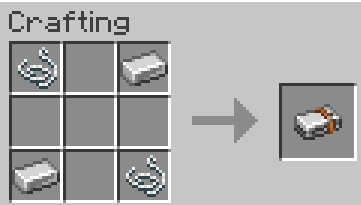

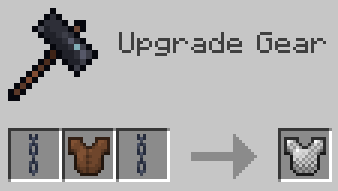
Allows you to upgrade your tools by tier using less materials! No longer will you need to groan about making a wooden pickaxe. Just turn it into a stone one.
Tools can be upgraded like so: Wood -> Stone/Gold -> Iron -> Diamond -> Netherite (Already In-game)
- Craft stone tools in a 2x2 grid using a wood tool and the normal amount of stone.
- Gold tools use a stick, wood tool, and gold ingot at a smithing table.
- Iron tools use a stick, stone/gold tool, and either an iron ingot or iron tool kit.
- Swords, shovels, and hoes use an ingot, while pickaxes and axes use an iron tool kit.
- Diamond tools use a stick, iron tool, and either a diamond or diamond tool kit.
- Swords, shovels, and hoes use a diamond, while pickaxes and axes use a diamond tool kit.
Armor can be upgraded like so: Leather -> Chainmail/Gold -> Iron -> Diamond -> Netherite (Already In-game)
- All armors can be upgraded using 2 of their respective material in a smithing table.
- (Material, then armor, then material.)
This mod literally just adds two items and some recipes. If you want to use this in a modpack, go ahead.
Quick facts
- Edition: Minecraft Java
- File type: .jar
- Minecraft version listed: 1.21.1
- How to install: Install the matching mod loader (Forge, Fabric or NeoForge) for your Minecraft version. → Download the .jar. → Put it in the .minecraft/mods folder and launch that loader profile.
- Where to get it: Opens on Modrinth — not every file is mirrored on our own servers.
Install steps are the general flow for this file type — How to install Minecraft Java mods & modpacks walks through it step by step.
Verified by MCModsHub
- Ships as better_tool_treatment-1.0.0-neoforge-1.21.1.jar — drop this file into the mods folder
- Download size: 31 KB
- Download link checked 8 Sept 2026 — working
These come from our own check of the pack file, not from the source page.