
Crusalis FoF
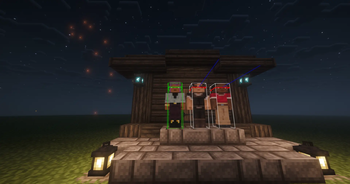
A simple Friend or Foe mod for Crusalis. Look at a player and their hitbox turns green, orange, or red based on if they're allies/neutrals/enemies.
⬇ Download on Modrinth

Crusalis FoF (Friend or Foe)
A lightweight, client-side Fabric mod that instantly identifies player allegiances by coloring their hitboxes based on your nation's relationship with them.

What it does
Relationship Coloring: When you look at a player (with hitboxes enabled via
F3+B), their hitbox color changes to reflect their diplomatic status:- 🟢 Green - Friendly: Players in your Town, your Nation, or an Allied Nation.
- 🟠 Orange - Neutral: Players with no specific diplomatic relation or unknown status.
- 🔴 Red - Enemy: Players belonging to a Nation marked as an Enemy.
Intelligent Targeting:
- Only colors the specific player you are looking at, keeping your screen clean.
- Uses raytracing to detect targets up to 256 blocks away, perfect for scouting or ranged combat.
Reads the Server's Own Tags:
- Detects each player's relationship straight from their in-game nameplate color. The same red / green / orange the server already shows above their head.
- Instant and always in sync, with no setup. (Optional: switch to Crusalis Dynmap map data in the config.)
Easy Setup
Works out of the box. Just install and play. No setup required.
- Auto-Detection: The mod automatically identifies your town and nation from the dynmap data on login.
- Live Updates: Relationship data is refreshed every 5 minutes to keep up with changing alliances.
- Smart Retry: If you join before the map API is ready, it keeps checking until it finds you.
- Optional Config: Choose the relationship source (nameplate tags or map data) and set the Dynmap address any time from the in-game settings (via Cloth Config + Mod Menu).
Server Control
Server administrators can disable this mod's features for all connected clients using a chat command if needed for events or balance testing.
- Disable:
[CrusalisFoF:DISABLE ??turgangs] - Enable:
[CrusalisFoF:ENABLE ??turgangs]
(Note: This is a client-side check listener, intended for organized events.)
Requirements
- Minecraft 1.21.11
- Fabric Loader + Fabric API
Installation
- Install Fabric Loader and Fabric API.
- Drop Crusalis FoF into your
.minecraft/mods/folder. - Launch the game and join Crusalis.
- Press F3+B to see hitboxes.
- Look at players to see their friend/foe status!
Privacy & Safety
- Client-Side Only: Does not require any server-side plugins.
- Public Data: Uses only publicly available data from the Crusalis Dynmap API.
- Safe: Does not send any personal data anywhere.
Compatibility
- Works alongside performance mods like Sodium.
- Compatible with most standard fabric mods.
Made by TurGangS for the Crusalis community.
- Edition: Minecraft Java
- File type: .jar
- Minecraft version listed: 1.21.11
- How to install: Install the matching mod loader (Forge, Fabric or NeoForge) for your Minecraft version. → Download the .jar. → Put it in the .minecraft/mods folder and launch that loader profile.
- Where to get it: Opens on Modrinth — not every file is mirrored on our own servers.
Install steps are the general flow for this file type — How to install Minecraft Java mods & modpacks walks through it step by step.
- Ships as crusalis-fof-1.2.0.jar — drop this file into the mods folder
- Download size: 54 KB
- Download link checked 8 Sept 2026 — working
These come from our own check of the pack file, not from the source page.