
RGB Redstone Lamps (Color Blocks)
Java mod listed for Minecraft 1.20. Downloads from the MC Java Mods app on Android.
⬇ Download on Modrinth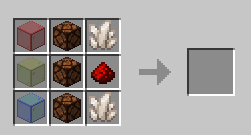
Color Blocks
Color Blocks is a mod for Minecraft Java Edition. It runs on the version 1.20.4 using the Fabric Loader. This guide will cover how to install, and use this mod.
Installation
This mod will run without any dependencies. Just install fabric and drop the jar file in the mods folder located in %appdata%/.minecraft/ to install the mod.
Usage
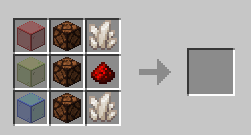
Once installed, you will be able to obtain the added, "RGB Lamp" in the Redstone tab of the creative section or by using this crafting recipe:
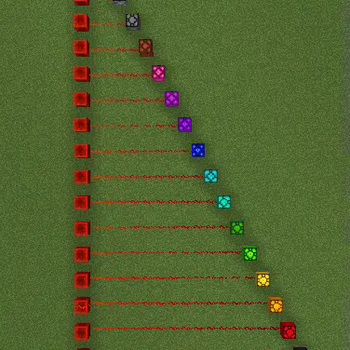
When giving the block a redstone signal, the block will change color depending on the strength of the signal. Here are all of the colors and their corresponding signal strenghts:
- 0 - black
- 1 - red
- 2 - orange
- 3 - yellow
- 4 - lime
- 5 - green
- 6 - cyan
- 7 - light blue
- 8 - blue
- 9 - purple
- 10 - magenta
- 11 - pink
- 12 - brown
- 13 - gray
- 14 - light gray
- 15 - white
This block also can only be collected by a pickaxe with silk touch. This mod is intended for redstone but can be used in building as well.
Bugs, Glitches and Issues
If there are any problems with this mod, report it here.
- Edition: Minecraft Java
- File type: .jar
- Minecraft version listed: 1.20.4
- How to install: Install the matching mod loader (Forge, Fabric or NeoForge) for your Minecraft version. → Download the .jar. → Put it in the .minecraft/mods folder and launch that loader profile.
- Where to get it: Opens on Modrinth — not every file is mirrored on our own servers.
Install steps are the general flow for this file type — How to install Minecraft Java mods & modpacks walks through it step by step.
- Ships as colorblocks-1.0.0.jar — drop this file into the mods folder
- Download size: 40 KB
- Download link checked 19 Oct 2026 — working
These come from our own check of the pack file, not from the source page.