
chathook
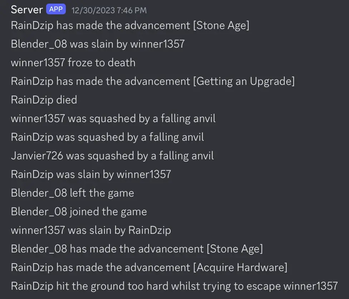
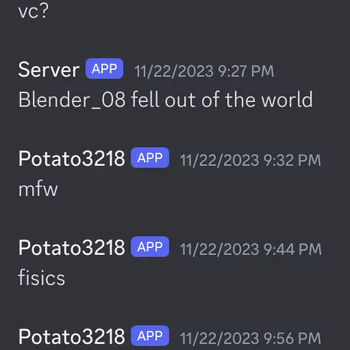
A logical server mod that forwards Minecraft chat, game and command messages to a Discord webhook.
How to Use
Create a file called secrets.txt in the root of your server (in the same folder as the server.jar.
In the file, write the following line:
webhook_url=[your webhook url here]
The webhook URL should be in the form of https://discord.com/api/webhooks/{some numbers}/{token}.
Now, just fire up the server and you're all set!
Known Limitations
- Command messages aren't captured
- Chat from Dynmap sends IP addresses in the text and these are not filtered by ChatHook (will be fixed by a message filtering feature in future)
Attribution
Quick facts
- Edition: Minecraft Java
- File type: .jar
- Minecraft versions listed: 1.20.1, 1.20.2, 1.20.3
- How to install: Install the matching mod loader (Forge, Fabric or NeoForge) for your Minecraft version. → Download the .jar. → Put it in the .minecraft/mods folder and launch that loader profile.
- Where to get it: Opens on Modrinth — not every file is mirrored on our own servers.
Install steps are the general flow for this file type — see the MC Java Mods guides for the full walkthrough.
Verified by MCModsHub
- Ships as chathook-0.1.0-alpha+1.20.1.jar — drop this file into the mods folder
- Download size: 12 KB
- Download link checked 8 Sept 2026 — working
These come from our own check of the pack file, not from the source page.